
Dictation for ADHD: How Voice Typing Helps with Writing
Starting a written task can take more energy than finishing it when attention and working memory are uneven. Spokenly is a voice dictation app for macOS, Windows, Linux, and iOS. It turns speech into text in any app, so getting the first words down asks for less effort than starting from a blinking cursor.
Updated May 2026
Download SpokenlyWhy writing can feel harder with ADHD
Typing pulls on working memory and motor planning at the same time. Holding a sentence in mind long enough to type it, while resisting the urge to rewrite it mid-line, is where the energy often runs out. The result is a draft that never starts, an inbox that grows by the day, or a notebook page that stays blank for an hour.
Writing on ADHD and assistive technology, including material from CHADD and ADHD-focused publications, points to the same gap: knowing what to say is rarely the problem, getting it onto a page is. The processing-speed cost and executive load of typing become a tax on every writing task, no matter how small. Voice input removes the fine motor work and the visual feedback loop that typing depends on.
Dictation is not a fix for attention or executive function challenges. It is a different input method that, for many writing situations, asks less of working memory that is already under strain.
How voice input changes writing friction
Speaking is faster than typing, roughly three times faster, and the motor pattern is automatic. Holding a phrase long enough to say it costs far less working memory than spelling the same phrase letter by letter.
That difference matters most at the start of a task, where the cost of beginning is highest. A blank document is intimidating. A half-spoken sentence is not. Once the first phrase exists, even in rough form, there is something to edit, and editing is easier than starting. Voice input lowers the threshold of starting, which is often the hardest part.
The trade-off is that spoken text needs cleanup. Filler words, restarts, and tangents end up in the transcript. Modern dictation tools can format text automatically, or run an AI rewrite to turn the spoken draft into a clean version. The raw transcript stays available as a fallback.
Common writing scenarios where dictation fits
Drafting an email that has been sitting in your head for days
Emotionally loaded replies stall for hours, then a week. Saying the draft out loud skips the loop that gets stuck searching for the perfect opening line. The dictated version is rough, but it exists, and editing a rough draft is far easier than starting from nothing.
Brain dumping after a meeting or before bed
When attention is scattered, thoughts can fade before they reach the keyboard. Dictation captures them at the speed they arrive, saves them as text, and leaves them ready to be sorted, searched, or pasted into a planner later.
Capturing ideas while walking, driving, or doing dishes
Movement often produces the kind of thinking that sitting in front of a screen does not. A quick keyboard shortcut, or a phone keyboard, means an idea can be saved in under three seconds, before attention moves on.
Journaling without the pressure of typing perfection
Typing invites editing mid-sentence. Speaking encourages flow. For end-of-day reflection or pre-task planning, dictation tends to produce longer entries because correcting typos no longer competes for attention.
Taking notes during lectures, podcasts, or reading sessions
Switching between listening and typing splits attention and drains it quickly. Dictation lets the listening stay primary, with short spoken summaries dropped into a note app between paragraphs or chapters.
What to look for in a dictation app
Not every dictation tool holds up in the moments where it matters most. The criteria below tend to separate the apps people open every day from the ones that get installed and forgotten in a week.
Activation under a second
If the path from idea to recording means opening an app, finding a menu, and tapping record, the idea is often gone by step two. A global keyboard shortcut and a small floating indicator are the difference between an app used every day and one that gets forgotten.
Works in every app, not just one
Email, chat, code editor, notes, browser forms. Dictation built into a single app only helps inside that app. A system-wide tool puts the same workflow everywhere the cursor lands.
Forgives restarts and tangents
Spoken thinking rarely arrives clean. Mid-sentence corrections, restarts, and topic shifts end up in any transcript. A capable dictation tool either cleans these up automatically or makes them easy to remove without retyping the surrounding text.
Available on the phone
Many of the moments where dictation matters most happen away from a desk. A keyboard that works inside any iOS app, not just the dictation app itself, removes the context switch needed to capture an idea.
Handles more than one language
For anyone who thinks or speaks in more than one language, forced single-language input becomes a small but constant frustration. Auto-detection of the spoken language, or fast manual switching, keeps dictation usable as thoughts arrive, not after.
How Spokenly fits these needs
The four features below cover the moments where dictation makes the biggest difference, especially when writing tasks feel out of proportion to their size.
System-wide hotkey and floating overlay
Spokenly lives in the menu bar and starts recording from any app with a single keyboard shortcut. A small overlay shows the recording state without pulling focus from the work in front of you. Stop recording and the text appears where the cursor sits.
AI Instructions that turn rough dictation into polished text
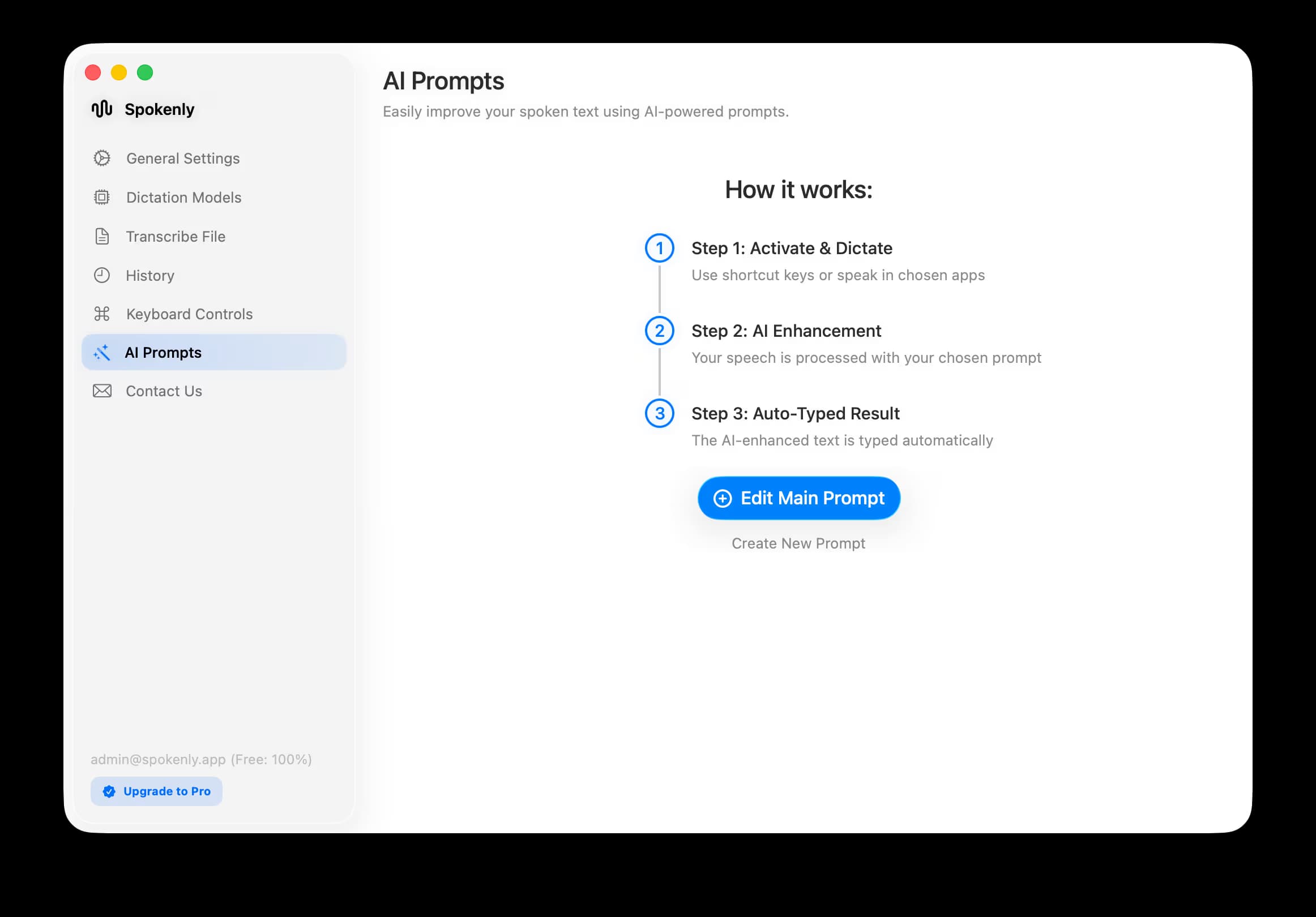
Spoken thoughts rarely arrive as final writing. Spokenly can pass the transcript through AI Instructions before pasting, using GPT-4, Claude, or other models. A rambling email turns into a clean reply; a scattered brain dump collapses into structured bullet points. The raw transcript is kept separately, and only the polished output reaches the cursor.
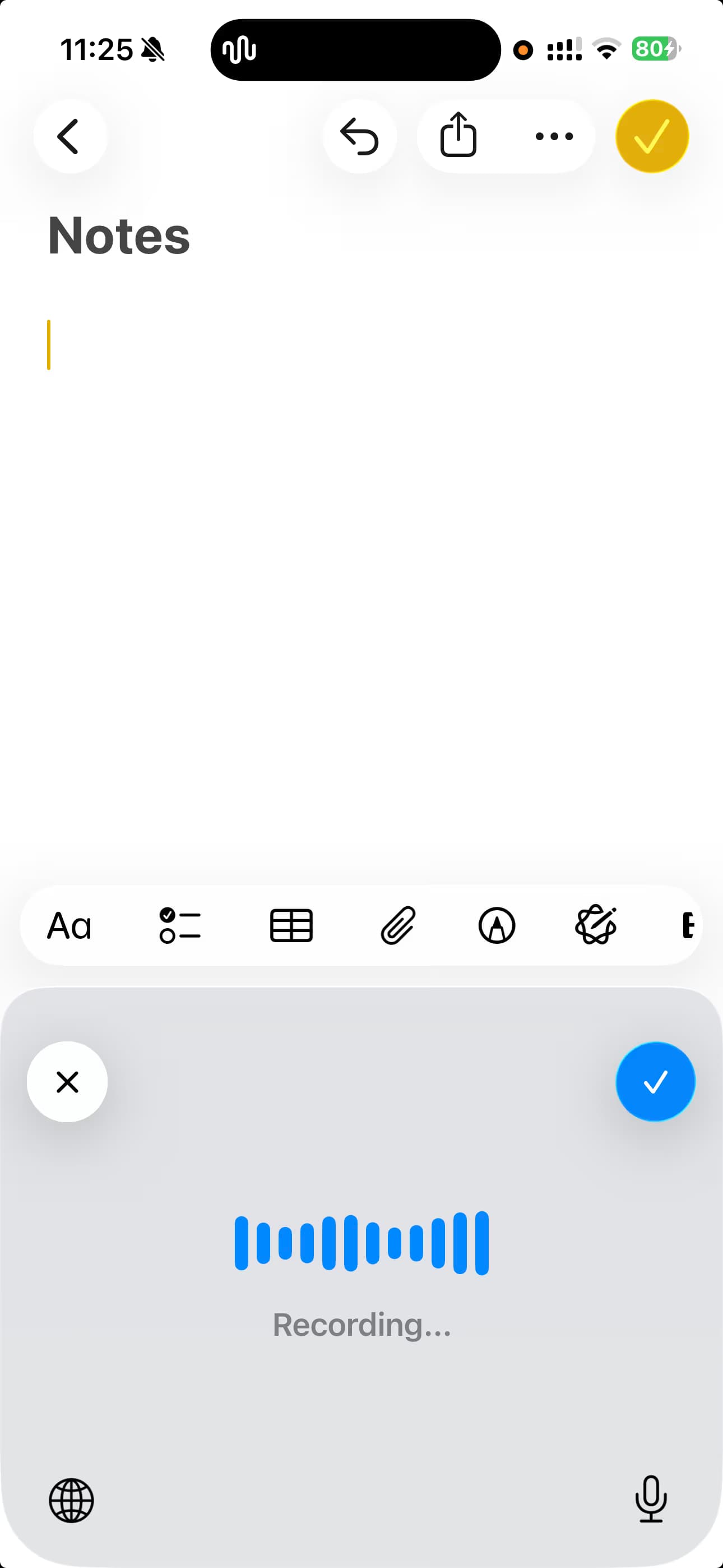
iOS keyboard for capture on the go
On iPhone and iPad, Spokenly works as a system keyboard, so it appears wherever the standard keyboard does. Messaging apps, notes, browsers, third-party email clients. Tap the microphone, speak, and the text lands in the input field. No copying out of a separate transcription app.
Over one hundred languages with auto-detection
Spokenly transcribes more than one hundred languages and detects the spoken one automatically. That matters for anyone who code-switches mid-sentence or works across a second or third language, since dictation no longer needs a trip to a language menu between sessions.
The dictation for iPhone page covers iOS keyboard setup in detail, and the dictation for writers guide walks through dictation as part of a longer drafting workflow. For fast, unstructured capture before organizing, compare the seven brain dump workflows and tools.
Where dictation is not the right tool
Voice input is a complement to typing, not a replacement for it. The cases below are usually faster or less awkward with the keyboard.
Bullet lists that need precise structure
Spoken language does not flow like a hierarchical outline. Dictating a quick brain dump first, then restructuring it into a list, tends to work better than dictating the list directly.
Very short messages
For a three-word reply, typing is faster than activating dictation, saying the words, and checking the output.
Quiet environments where speaking is awkward
Libraries, open offices, public transport. Dictation works best in places where speaking aloud does not interrupt anyone, which is why it complements typing rather than replacing it.
Getting started
Download Spokenly
Available for macOS, Windows, Linux, and iOS. The download includes local models that work offline, with no account required to start.
Set a comfortable global shortcut
Pick a key combination that does not collide with anything else, ideally one reachable with a single hand so it can be triggered without breaking flow.
Pick one starting use case
Changing every habit at once tends to fail. One recurring task is enough to test the fit. A daily journal entry, or one specific kind of email reply, used for a few days, will show whether dictation belongs in the workflow.
The dictation for Mac page covers macOS setup including hotkey configuration and choosing between local and cloud transcription models.
Frequently asked questions
Can voice dictation help with ADHD writing struggles?
Many people with ADHD find speaking easier than typing when the bottleneck is starting a task, not knowing what to say. Dictation lowers the energy needed to begin, captures ideas at the speed of speech, and skips the perfectionism loop that a blinking cursor can trigger. It is not a treatment for ADHD and results vary by person, but it is a low-friction workflow change worth testing on a few real tasks.
What is the easiest way to start dictating?
Install a dictation app, assign one keyboard shortcut, and use it the next time a writing task feels stuck. The first sessions tend to feel awkward because spoken drafts read differently from typed ones. After a few attempts, the rhythm of speak rough then edit becomes natural and the time to a first draft drops noticeably.
Does dictation work on iPhone the same way as on Mac?
On iPhone and iPad, Spokenly works as a system keyboard, which can be selected inside any app where text is entered. Tap the microphone, speak, and the transcribed text lands in the input field. On Mac, dictation runs through a global keyboard shortcut that places text at the cursor in whichever app is currently in focus.
Can dictated text be edited or polished automatically?
Yes. Spokenly supports modes with AI Instructions that process the transcript before it is pasted. AI Instructions can rewrite a rambling draft into a clear email, condense a brain dump into bullet points, translate into another language, or just clean up filler words. The raw transcript is kept separately, and only the AI output gets inserted at the cursor.
Is multilingual dictation supported?
Spokenly transcribes more than one hundred languages and can auto-detect the one being spoken. For people who switch languages within a single sentence, this removes the need to dig through a language menu and lets dictation follow the way the thought arrives.
Lower the cost of starting
Free download for macOS, Windows, Linux, and iOS. Local models work offline.
Download Spokenly