
What You Actually Want to Do
You have an MP3 file (a podcast episode, lecture recording, interview, voice memo, customer call) and you want a searchable text transcript on your Mac. The job sounds simple. In practice, three things make it hard:
- File length and size limits: a 90-minute podcast hits the 25 MB cap on the OpenAI Whisper API and the 30-minute cap on Otter's free tier.
- Cost per minute: commercial transcription services charge $0.20 to $1.99 per minute. Ten hours of audio runs $120 to $1,200.
- Privacy of sensitive audio: legal depositions, medical recordings, and journalism source interviews cannot be uploaded to providers that retain audio for training.
This guide compares four real Mac workflows for converting MP3 to text, ranked by cost, privacy, and accuracy. For other audio file formats, see the broader audio to text converter guide.
The Fast Path: Spokenly Free Local Mode
Spokenly handles the three constraints above out of the box: no length limit, no cost in local mode, and audio stays on your Mac. Free with local Whisper and Parakeet, plus BYOK cloud transcription using your own API key when you need top accuracy.
- Free forever with local Whisper and Parakeet. No account, no card, no quota.
- No file size or length limit. Transcribe 1 minute or 12 hours, same flow.
- Privacy by default. File never leaves your Mac unless you pick a cloud model with your own key.
- 100+ languages including code-switching and auto-detect via Whisper Large V3.
- Accepts MP3, M4A, WAV, MP4, MOV, M4V directly. No format conversion required.
- Optimized for Apple Silicon. Parakeet V3 transcribes a 1-hour file in 5-10 minutes on M3/M4.
See Spokenly for Mac or compare against alternatives in 2026 dictation app roundup.
Four Ways to Convert MP3 to Text on Mac
Pick the right method based on file count, accuracy needs, and privacy requirements.
| Method | Cost | Best for |
|---|---|---|
| Spokenly | Free local, BYOK cloud | Most users; privacy + accuracy + zero cost |
| Apple Notes / Voice Memos | Free | Quick personal recordings, English-heavy |
| whisper.cpp via Terminal | Free | Power users, batch scripts, full control |
| Online tools (Otter, Rev, etc.) | $15-150+/10h | Team collab features (and you accept upload) |
Method 1: Spokenly (Recommended)
Picks Apple Silicon Neural Engine via CoreML for Parakeet V3, runs entirely offline on local models, and exports TXT, SRT, or VTT in one click.
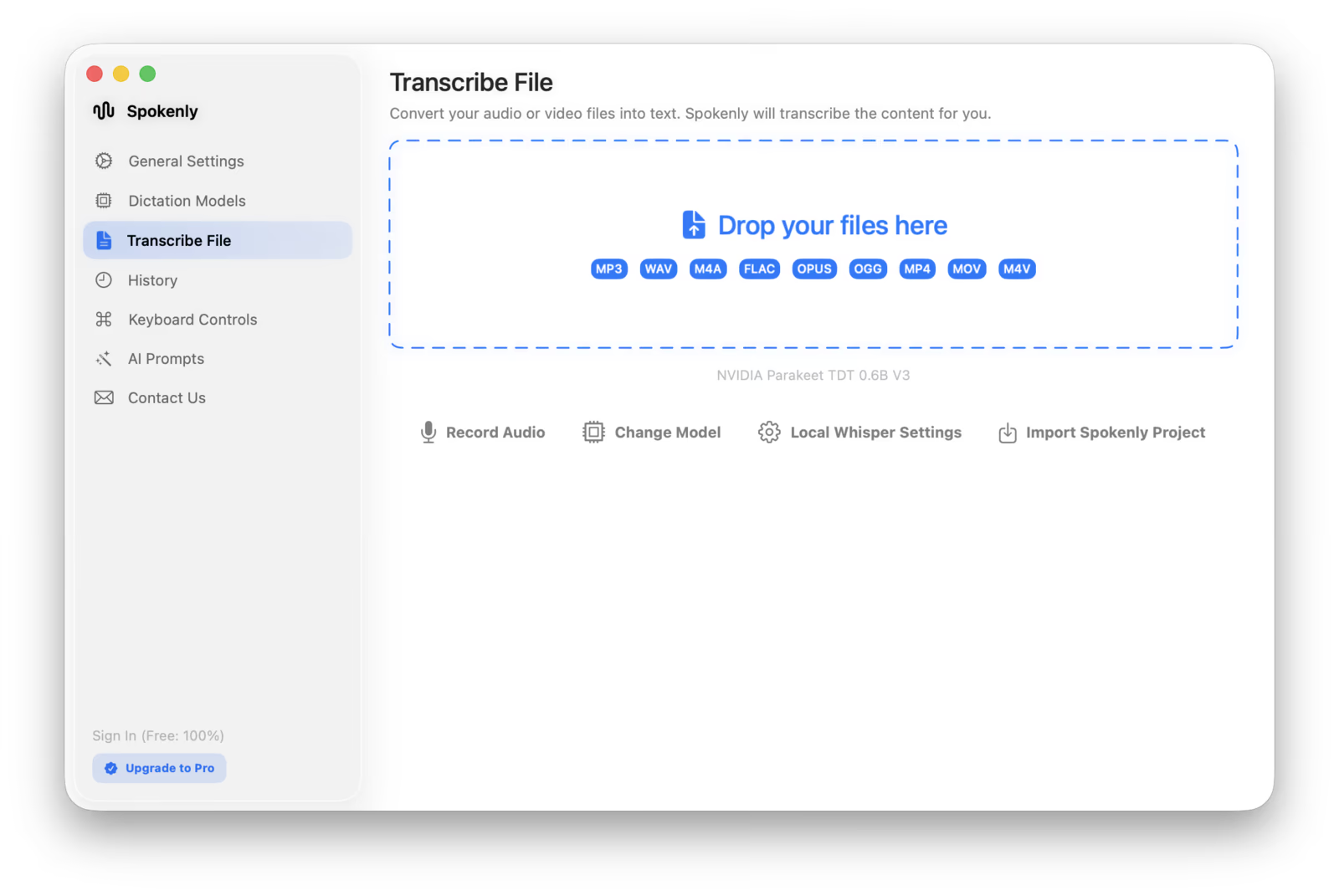
- 1Install Spokenly free from spokenly.app or the Mac App Store. No account required.
- 2Open the app and click Transcribe File, or drag your MP3 directly into the window.
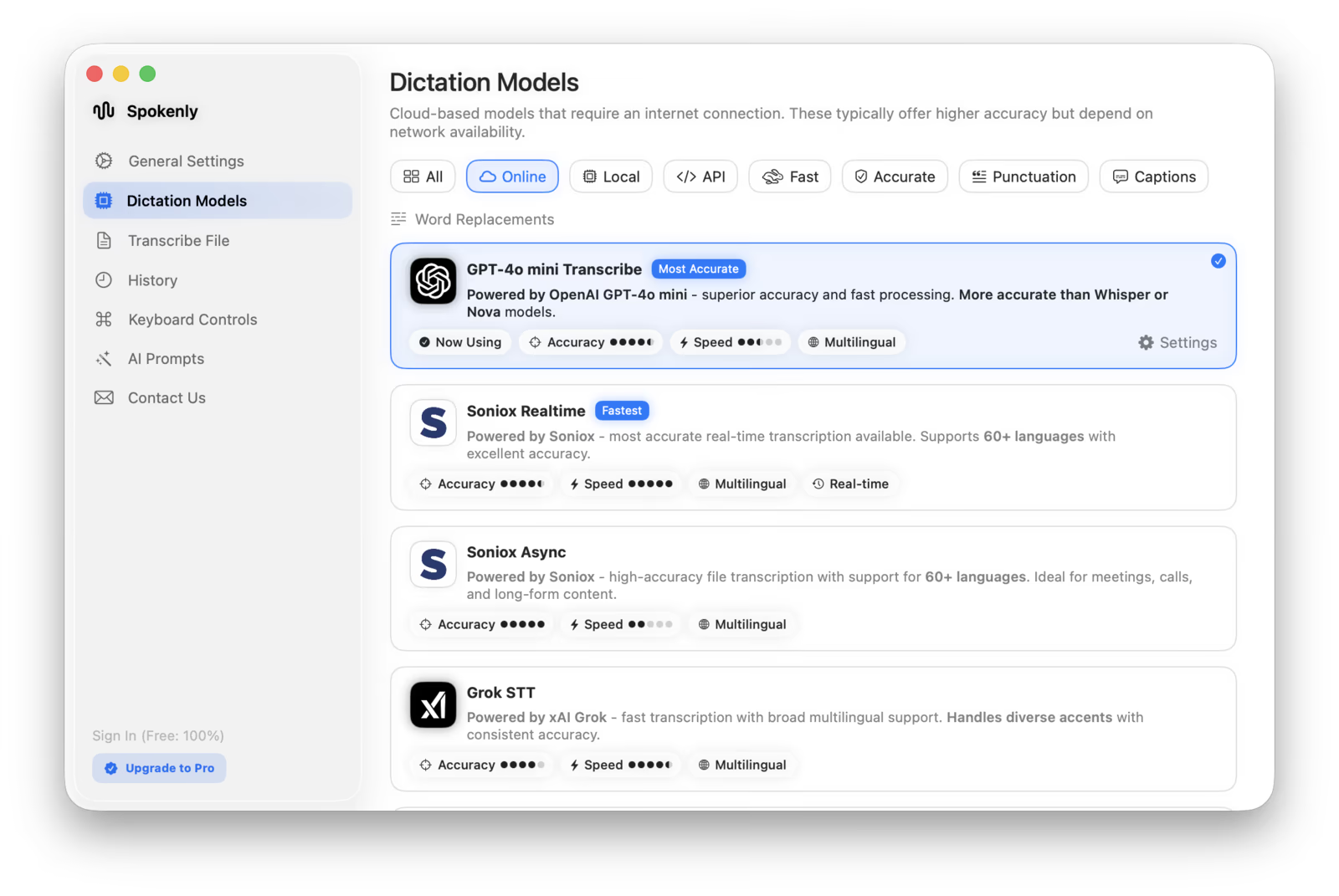
- 3Pick a model: Whisper Large V3 (most accurate local), Parakeet V3 (fastest local), GPT-4o Transcribe (best cloud).
- 4Enter an OpenAI, Deepgram, or Groq API key for BYOK cloud models, or skip for local-only. Spokenly Pro also includes managed cloud transcription.
- 5Wait for processing. Local: 1-5x realtime depending on chip. Cloud: near-instant for files under 25 MB.
- 6Copy the transcript or export as TXT, SRT, VTT.
Spokenly accepts MP3, M4A, WAV, MP4, MOV, and M4V natively. No format conversion step required. If your search is for MP3 to transcript or an MP3 to text converter, this is the same workflow.
Method 2: Apple Notes / Voice Memos
Apple's built-in tools handle two narrow cases: recordings made inside Voice Memos on iPhone (iOS 18+) and audio recorded inside the Notes app on supported devices. Neither transcribes MP3 files you already have.
- 1On iPhone with iOS 18 or later, open Voice Memos, tap any saved recording, then tap the speech-bubble icon above playback to view the transcript.
- 2On Mac, open the Notes app and record audio directly in a note. On Apple Intelligence devices, an optional transcript appears alongside the recording.
- 3For imported MP3, M4A, or WAV files, fall back to Spokenly (Method 1) or whisper.cpp (Method 3).
Limitations: about 10 supported languages, no speaker diarization, no SRT export, and only audio recorded in-app, not imported files.
For iPhone Voice Memos transcript view, see voice memo to text on iPhone.
Method 3: whisper.cpp via Terminal
For power users comfortable with the command line. Free, fully local, and scriptable for batch jobs.
- 1Install Homebrew if not already installed.
- 2Run: brew install whisper-cpp
- 3Download a model: bash ./models/download-ggml-model.sh large-v3
- 4Convert MP3 to 16 kHz WAV: ffmpeg -i input.mp3 -ar 16000 output.wav
- 5Run: whisper-cpp -m models/ggml-large-v3.bin -f output.wav --output-vtt
CLI-only, requires ffmpeg for format conversion, and Metal env var setup for GPU acceleration on Apple Silicon. Spokenly wraps all of this in a GUI.
Method 4: Online Tools (Trade-offs)
Otter, Happy Scribe, Rev, Trint, Sonix, Descript. Web-based with team collaboration features.
- +Zero install. Team sharing, comments, summary features.
- -File leaves your Mac, subject to provider retention and training policies.
- -File size and duration caps (25 MB to 5 GB depending on tier).
- -Cost adds up fast: $15-150+ per 10 hours.
- !Avoid for confidential audio: legal depositions, medical, journalism source interviews.
Real Cost Comparison: 10 Hours of Audio
| Service | Pricing | Cost for 10h | Limits |
|---|---|---|---|
| Spokenly local | $0 forever | $0 | None, unlimited length, no caps |
| Spokenly + your OpenAI key | $0 | ~$3.60 ($0.006/min) | Provider rate only, no markup |
| Otter Pro | $16.99/mo | $17/mo flat | Free tier capped at 300 min/mo with a 30-min conversation limit |
| Rev AI | PAYG | $150 ($0.25/min) | No free tier |
| Rev Human | PAYG | $1,194 ($1.99/min) | Premium price |
| Trint | From ~$52/mo | Plan-dependent | Pricing gated; entry plan caps file count |
| Sonix Standard | PAYG | $100 ($10/hr) | No free tier |
| Descript Creator | $24/mo | Bundled minutes plus likely top-ups | Free tier limited to a few short transcripts |
| Happy Scribe AI | €17-89/mo | ~$130 (€0.20/min) | EUR pricing, credits expire |
Does MP3 Bitrate Matter for Accuracy?
Less than you might think. Studies of Whisper Large V3 show 128-192 kbps is the sweet spot for voice content. Going from 320 kbps to 128 kbps causes only 2.4% relative WER degradation. For format conversion, the open-source ffmpeg handles MP3 to WAV in one command.
- +128-192 kbps: sweet spot, best accuracy/storage balance.
- ~320 kbps: diminishing returns for voice; useful for music + speech mixed content.
- -Below 64 kbps: metallic artifacts hurt accuracy noticeably.
Practical takeaway: do not waste storage on 320 kbps for voice-only recordings. Re-encoding M4A to MP3 throws away quality; transcribe the original M4A whenever possible.
Long Files, Multiple Speakers, Languages
Long files: 1-hour MP3 at 128 kbps is about 56 MB. 3-hour podcast at 96 kbps is around 130 MB. OpenAI Whisper API caps uploads at 25 MB; Spokenly local has no length limit.
Multiple speakers: vanilla Whisper does not include diarization. Cloud APIs (Deepgram Nova, Soniox) include speaker labels at 90-98% accuracy on clean 2-5 speaker audio. Phone audio and overlapping speech drop diarization to 85-90%.
Multilingual: Whisper auto-detects from the first 30 seconds. Code-switching mid-file confuses it; for mixed-language interviews, set the language explicitly or split files by speaker. GPT-4o Transcribe handles code-switching better in our tests.
Real-World Accuracy Expectations
| Audio type | Whisper L3 WER | Note |
|---|---|---|
| Clean studio audiobook | ~2.7% | Near-perfect, light editing only |
| Podcast (single host, treated room) | 5-8% | Production-ready with quick proofread |
| Interview (Zoom, two speakers) | 8-12% | Solid; expect occasional misheard names |
| Field recording (cafe, outdoor) | 12-18% | Usable; noise filters help |
| Phone call (8 kHz codec) | +5-10% over baseline | Numbers and names suffer |
| Multiple overlapping speakers | +5-10% over baseline | Diarization breaks down |
| Heavy non-native accent | +5-15% over native | Set language explicitly |
| Technical / medical / legal jargon | +2-5% over baseline | Acronyms and proper nouns need manual review |
Parakeet V3 vs Whisper Large V3 on English clean audio: 6.32% vs 7.44% WER, with zero hallucinations on Parakeet and 3-6x faster processing. Choose Parakeet for English speed; Whisper for multilingual coverage.
Use Cases
- +Podcast transcription for show notes, blog repurposing, SEO indexing.
- +Meeting recordings (board, sales, all-hands) downloaded from Zoom or Teams.
- +Lecture and class recordings for searchable study notes.
- +Voice memo backlog from years of iPhone iCloud recordings.
- +Audiobook conversion for personal study and accessibility.
- +Interview transcription for qualitative researchers, podcasters, journalists.
- +Legal depositions and hearings (privacy-critical, local mode mandatory).
- +Journalism source interviews (confidential audio that cannot leave device).
- +Sermon and religious content archiving and indexing.
- +YouTube video to MP3 to text for caption generation.
- +Customer support QA, sales call review, training material extraction.
- +Academic research: focus groups, ethnographic interviews, oral history projects.
Privacy: Local vs Cloud
Most online transcription services retain audio for training or quality review. Read the terms before uploading sensitive material.
- Local (Spokenly, whisper.cpp): file never leaves your Mac. Required for HIPAA, legal, journalism, or any source-confidential audio. Spokenly's Local Models tab includes Parakeet V3 (multilingual), Parakeet V2 (English-only fastest), Apple Speech Analyzer (macOS 26+), and Qwen3-ASR for Asian languages.
- BYOK cloud (Spokenly + your OpenAI/Deepgram key): uses your API account directly. OpenAI and Deepgram offer no-training opt-outs in their enterprise terms.
- !Consumer SaaS (Otter, Rev, Happy Scribe): file uploads to the provider; check retention and training terms before sending sensitive content.
FAQ
How do I transcribe an MP3 to text for free on a Mac?
Install Spokenly free from spokenly.app. Drag your MP3 into the app and pick a local model (Whisper Large V3 for accuracy, Parakeet V3 for speed). Wait for processing, then copy or export the text as TXT, SRT, or VTT. No account, no upload, no quota, no time limit.
How do I convert MP3 to text transcript?
Open Spokenly, drop the MP3 into Transcribe File, select the spoken language and model, then export the transcript as TXT, Markdown, SRT, VTT, JSON, or FCPXML. The same workflow also works for M4A, WAV, MP4, MOV, and M4V files.
Can macOS Notes app transcribe MP3 files?
Apple Notes does not auto-transcribe imported MP3 or M4A files on macOS. Notes can record new audio with optional transcription on Apple Intelligence devices, but it does not transcribe imported audio. For imported MP3 transcription, use Spokenly (drag-and-drop), iPhone Voice Memos transcript view (recordings made in the app only), or whisper.cpp via Terminal.
What is the most accurate MP3 to text converter?
GPT-4o Transcribe and Deepgram Nova-3 lead with 5-9% word error rate on real-world audio, beating consumer apps. Whisper Large V3 (local) reaches 8-12% WER on real-world audio with 2.7% on clean studio recordings. Spokenly defaults to GPT-4o Transcribe via cloud, with local Whisper available offline.
Is there a way to transcribe a 3-hour MP3 without paying?
Yes, with Spokenly's local Whisper or Parakeet models. Drop the file, pick a local model, and let it process. A 3-hour MP3 transcribes in roughly 30-90 minutes on Apple Silicon depending on the chip. No upload, no file size cap, no length cap, $0.
Can I transcribe MP3 offline on Mac without internet?
Yes. Spokenly's local Whisper and Parakeet models run entirely on your Mac. Once installed, you can disconnect from the internet completely and transcribe any MP3. Required for HIPAA, legal, or journalism source-confidential audio that cannot leave the device.
How long does it take to transcribe a 1-hour MP3?
On M3 or M4 Mac with Parakeet V3: 5-10 minutes. With Whisper Large V3 Turbo: 15-25 minutes. With Whisper Large V3: 30-60 minutes. Cloud GPT-4o Transcribe via BYOK: 5-10 minutes total including upload. Intel Macs are 2-3x slower locally; cloud is the better choice on Intel.
Does MP3 quality affect transcription accuracy?
128 kbps and above is the sweet spot. Going from 320 kbps to 128 kbps shows only 2.4% relative WER degradation for voice content. Below 64 kbps introduces metallic artifacts that hurt accuracy. For voice-only recordings, do not waste storage on 320 kbps. Modern models handle compressed MP3 well.
How do I transcribe an MP3 with multiple speakers (speaker diarization)?
Vanilla Whisper does not include diarization. WhisperX or pyannote.audio add speaker labels. Cloud APIs like Deepgram Nova and Soniox include diarization natively at 90-98% accuracy depending on speaker count and audio quality. Spokenly supports speaker diarization via cloud models.
Can I transcribe a multilingual MP3 file?
Whisper Large V3 supports 90+ languages and auto-detects language from the first 30 seconds. Code-switching mid-file confuses it; for mixed-language content, set the language explicitly or split the file by speaker. GPT-4o Transcribe handles code-switching better in our tests.
What is the maximum MP3 file size I can transcribe?
OpenAI Whisper API caps at 25 MB. Most online tools cap at 100-500 MB. Spokenly local has no size or length limit; only your disk space and patience constrain it. Test files up to 12 hours work without issue on Apple Silicon.
Can I trust online services with confidential MP3 audio?
Most online transcription services retain audio for training or quality review. Read the terms before uploading legal depositions, medical recordings, or journalism source interviews. Spokenly local mode keeps audio entirely on your Mac with no upload, suitable for HIPAA and source-confidentiality requirements.
How do I add timestamps or SRT/VTT subtitles from an MP3?
Spokenly exports SRT and VTT subtitle files with timestamps directly. Open the transcript view, click Export, pick SRT or VTT. whisper.cpp via Terminal also outputs SRT with the --output-srt flag. Online tools vary; many require a paid tier for subtitle export.
Ready to try Spokenly?
Free to use with local models. No account required.
Download Spokenly