
Why People Look for a Descript Alternative

Descript is a video and podcast editor built on text-based editing: it transcribes your media, and you cut the recording by cutting the transcript. Underlord (its AI co-editor), Overdub voice cloning, Studio Sound, filler-word removal, and screen recording sit on top. The company behind it has scale: about $100M raised, including a $50M Series C led by the OpenAI Startup Fund, plus the acquisition of the remote-recording platform SquadCast.
The common reasons people go looking for a replacement are less about features and more about the meter:
Media-hour caps
Every plan limits how many hours of audio and video you can upload and transcribe per month: 1 hour on Free, 10 on Hobbyist, 30 on Creator, 40 on Business. Transcription volume, not editing, is what pushes people into higher tiers.
AI credits
Underlord actions, Studio Sound, and other AI features draw from a monthly credit pool (100 one-time on Free, 400 to 1,500 per month on paid tiers). Heavy AI use burns through the allowance quickly.
Watermarked free exports
The free plan exports at 720p with a Descript watermark, so it works as a trial rather than a lasting free tier.
Cloud-hosted projects
Projects live in Descript's cloud, and the editor depends on a steady internet connection. Review scores split sharply by platform (4.6/5 on G2 vs 3.0/5 on Trustpilot as of July 2026), with the Trustpilot side dominated by bug and billing complaints.
What Descript Costs in 2026
Current tiers from the Descript pricing page, checked July 2026. Media hours cover upload, recording, and transcription combined.
| Tier | Price | Included |
|---|---|---|
| Free | $0 | 1 media hour/month, 100 one-time AI credits, 720p watermarked export |
| Hobbyist | $24/mo, or $16/mo billed annually | 10 media hours/month, 400 AI credits/month |
| Creator | $35/mo, or $24/mo billed annually | 30 media hours/month, 800 AI credits/month |
| Business | $65/mo, or $50/mo billed annually | 40 media hours/month, 1,500 AI credits/month |
A year of Creator on the annual plan runs about $288. If transcription is the part you actually use, weigh that $288 against the alternatives below: several do the same job free or for a one-time payment.
5 Alternatives Compared
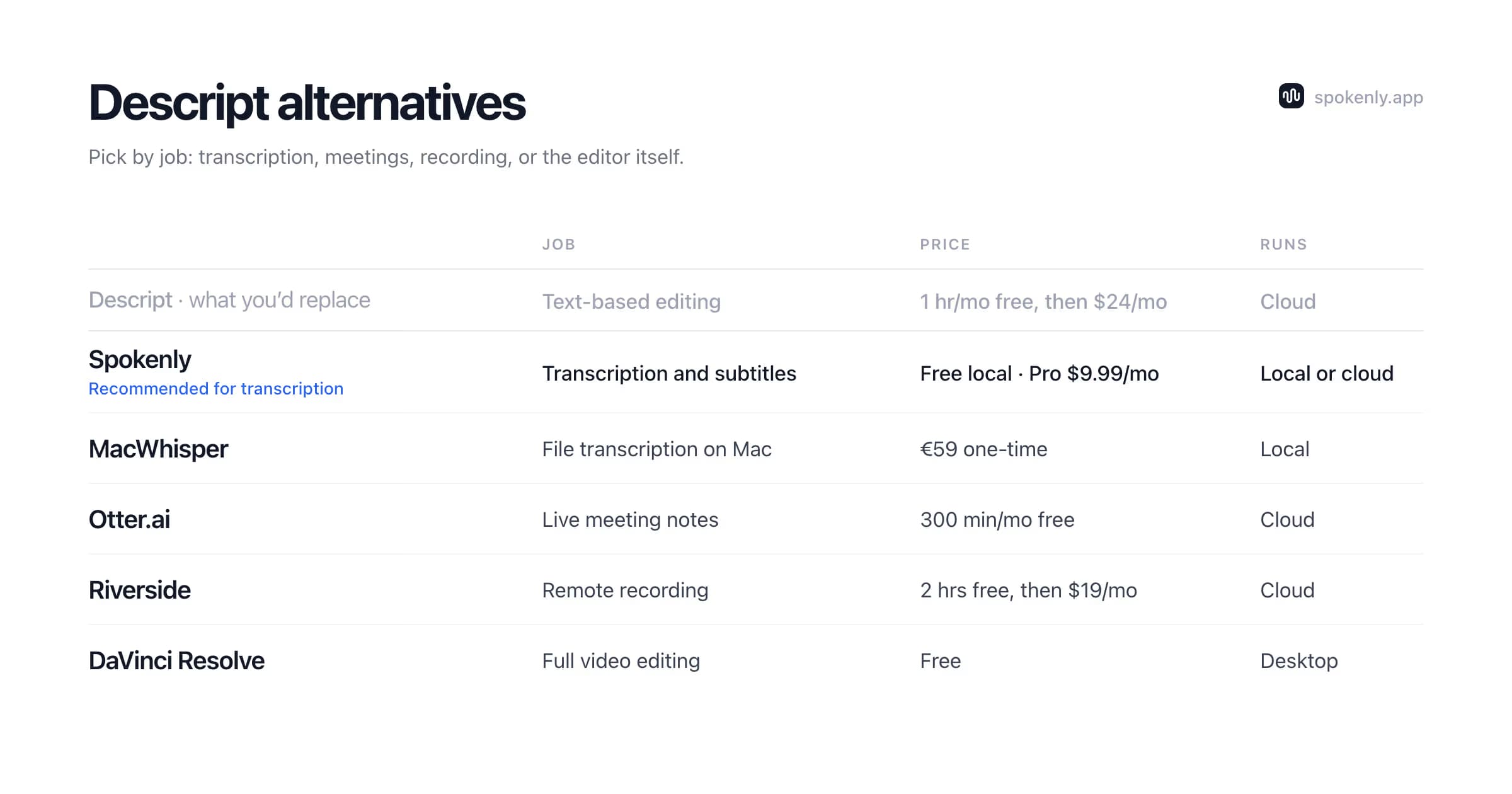
Descript bundles four jobs into one subscription: file transcription, subtitle export, recording, and video editing. The realistic move is to replace the jobs you use, not the whole bundle.
Spokenly
Free with local models; Pro $9.99/mo
Transcription and subtitles: no hour cap with local models, exports TXT, SRT, VTT, Markdown, FCPXML, JSON
Processing: Local processing available; Mac, Windows, Linux, iPhone
MacWhisper
€59 one-time (Gumroad)
File transcription on Mac with speaker labels in the paid version
Processing: Local Whisper models, on-device
Otter.ai
Free 300 min/mo; Pro $8.33/mo billed annually
Live meeting transcription with speaker ID; free plan caps conversations at 30 min and 3 file imports total
Processing: Cloud
Riverside
Free 2 hrs watermarked; Standard $19/mo billed annually
Remote podcast and video recording with transcription; Pro adds 4K and 15 hrs of transcription per month
Processing: Cloud, records locally then uploads
DaVinci Resolve
Free; Studio is a one-time license
Full video editor: cut, color, audio, delivery, no watermark on the free version
Processing: Desktop app for Mac, Windows, Linux
Descript, for reference
Free 1 hr/mo watermarked; Creator $24/mo billed annually
Text-based video and podcast editing with 30 media hours per month on Creator
Processing: Cloud projects
Spokenly for Transcription and Subtitles
Scope note first: Spokenly is a dictation and transcription app, not a video editor. It does not cut timelines, clone voices, or record your screen. What it replaces is one specific part of Descript: turning audio and video files into transcripts and subtitle files.
- 1Drop an audio or video file into Transcribe File on Mac, Windows, Linux, or iPhone.
- 2Pick a local model such as Parakeet V3 (Apple Silicon Macs) or Whisper Large V3 Turbo (free, on-device), or use a cloud model through your own OpenAI, Deepgram, or Groq key.
- 3Export TXT, SRT, VTT, Markdown, FCPXML, or JSON, and load the file into your editor or straight into YouTube captions.
Because local models run on your hardware, there is no media-hour meter: a 3-hour interview costs the same to transcribe as a 3-minute clip. FCPXML export drops transcripts straight into Final Cut Pro, and SRT or VTT works in Resolve, Premiere, and YouTube. The full workflows are in the audio to SRT guide and the audio to text guide.
Spokenly is free with local models or your own API keys; Pro at $9.99/mo adds managed cloud models with nothing to configure. Privacy is the other structural difference: Descript processes projects in its cloud, while Spokenly's Local Only Mode blocks all outbound network traffic, so confidential recordings never leave the machine.
MacWhisper, Otter, Riverside, and DaVinci Resolve
MacWhisper
MacWhisper is a Mac file-transcription app with local Whisper models, speaker labels in the paid edition, and YouTube URL transcription. The Gumroad license is €59 one-time, which undercuts a single year of Descript Creator. It is file-focused and Apple-only: Mac first, with an iOS app but no Windows or Linux version. See the Spokenly vs MacWhisper comparison for the feature-by-feature breakdown.
Otter.ai
Otter is the meeting specialist: it joins or records calls, labels speakers, and produces live notes. The free plan includes 300 minutes per month but caps each conversation at 30 minutes and allows 3 file imports in total, so it is not a file-transcription workhorse. Pro is $8.33/mo billed annually for 1,200 minutes. The Otter pricing guide breaks down the plans.
Riverside
Riverside replaces the recording half of Descript, especially now that Descript is folding SquadCast into its own app. It records each remote guest locally in up to 4K, uploads the files afterward, and adds transcription and clip generation. Standard is $19/mo billed annually with unlimited recording; the free tier watermarks exports. If you used Descript mainly to record podcasts with remote guests, this is the closest swap.
DaVinci Resolve
DaVinci Resolve is the answer when you need the actual video editor. The free version is a professional editor with cutting, color grading, audio, and effects, no watermark. It does not edit by transcript, and that is a real loss if deleting a sentence to delete the footage was the point of Descript for you: with Resolve, you transcribe in a separate tool, use the transcript to find your cuts, and make them on the timeline. For the transcription and captioning half of the job, pairing Resolve with Spokenly's SRT and FCPXML export removes the recurring cost entirely.
When Descript Is the Right Tool
A fair comparison cuts both ways. Descript earns its subscription when:
- +You edit video or podcasts by deleting sentences from a transcript and want that to be the whole workflow.
- +You use Overdub to fix flubbed lines by typing instead of re-recording.
- +You want recording, editing, AI cleanup, and publishing in one place and your monthly volume fits inside the media-hour cap.
- +Your team collaborates on edits in the cloud, and versioned projects matter more than offline control.
If those describe your week, staying is reasonable. The switch pays off when the meter charges you for transcription you could run locally for free.
Best Pick by Use Case
Transcribing interviews and podcasts
Spokenly with a local model: no hour cap, no upload, free. MacWhisper is the one-time-purchase route and adds speaker labels in its paid edition.
Subtitles and captions for video
Spokenly's SRT, VTT, and FCPXML export feeds any editor, including Final Cut, Resolve, and Premiere, without a per-hour meter.
Live meeting notes
Otter joins the call, labels speakers, and writes the summary; recording live meetings was always a side job for Descript.
Remote podcast recording
Riverside records each guest locally in high quality. Pair it with local transcription instead of paying for media hours.
Full video editing
The free version of DaVinci Resolve handles cutting, color, and delivery. Keep text-based editing only if it saves you real hours; that choice means staying with Descript.
Confidential recordings
Spokenly in Local Only Mode: transcription runs on-device with outbound traffic blocked, so nothing is uploaded anywhere.
Mixed setups work: record in Riverside, transcribe in Spokenly, cut in Resolve. The recording studio stays a subscription, but nothing meters your transcription hours anymore. Start from the job that hits the cap first, usually transcription, and replace that one.
FAQ
What is the best free alternative to Descript?
It depends on which part of Descript you used. For transcription and subtitles, Spokenly is free with local models and has no monthly hour cap. For video editing, the free version of DaVinci Resolve handles cutting, color, and audio without a watermark. Descript's own free plan stops at 60 media minutes per month and watermarks exports.
Is there a Descript alternative just for transcription?
Yes. Spokenly and MacWhisper both transcribe audio and video files on your own hardware, so there is no per-minute meter. Spokenly runs on Mac, Windows, Linux, and iPhone and exports TXT, SRT, VTT, Markdown, FCPXML, and JSON. MacWhisper is a one-time license for Mac (with an iOS app, but no Windows or Linux version).
What is the cheapest way to get SRT subtitles without Descript?
Transcribe the file locally and export SRT directly. Spokenly does this for free with a local Whisper model (or Parakeet V3 on Apple Silicon Macs): drop in the video, transcribe, export SRT or VTT, and load the file into your editor. No upload, no watermark, no monthly cap. On a Mac, MacWhisper handles the same job for a one-time €59.
Why do Descript bills go up?
Descript restructured its plans around two meters. Media hours cap how much audio and video you can upload and transcribe each month; AI credits power Underlord, Studio Sound, and other AI actions. Heavy AI use can exhaust the monthly credit pool, and higher transcription volume requires a higher tier, so the same workload can cost more than it did on the older plans.
Descript vs Otter: which is better for pure transcription?
Neither is built purely for files. Otter is strongest for live meetings with speaker labels, but its free plan caps each conversation at 30 minutes and allows 3 file imports in total. Descript transcribes files well but meters everything in media hours. For file transcription without caps, a local tool like Spokenly or MacWhisper is the more direct fit.
Is there an offline or open-source Descript alternative?
For the transcription half, yes. OpenAI's Whisper model is open source and free to run, and Spokenly wraps it (plus Parakeet) in a regular desktop app with subtitle export, and everything runs on-device. For the editing half, DaVinci Resolve's free version is closed source but costs nothing, and Audacity handles the open-source audio side.
Does Descript have a free plan, and what are its limits?
Yes. The free plan includes 60 media minutes per month, 100 one-time AI credits, and 720p export with a watermark. It is enough to evaluate the editor, but any recurring transcription or clean export requires a paid tier.
When is Descript still the right choice?
When you cut video or podcasts by editing text and want recording, transcription, editing, and publishing in one tool. Overdub voice cloning, filler-word removal, and Underlord AI edits are built into that workflow rather than bolted on. None of the transcription-first alternatives replicate it.
Ready to try Spokenly?
Free to use with local models. No account required.
Download SpokenlyRead next