
Check Built-In Transcripts First
Check whether the platform already has a transcript. Apple Podcasts transcripts let listeners follow the text, search within an episode, and copy up to 200 words with attribution. Creators can download Apple-generated transcripts in Apple Podcasts Connect, edit them, and supply a corrected VTT or SRT file through their host or Connect for subscriber episodes.
Spotify listeners can read available transcripts in the mobile app. Eligible creators have broader controls in Spotify for Creators: download the VTT, correct it, upload VTT or SRT, and distribute it through RSS. Availability still varies by show and account.
For listeners, built-in text is fastest when it exists. For creators who need a clean master transcript, or listeners working with an episode that has no transcript, the audio file gives full control over editing, search, summaries, and export formats.
Get the Episode Audio File
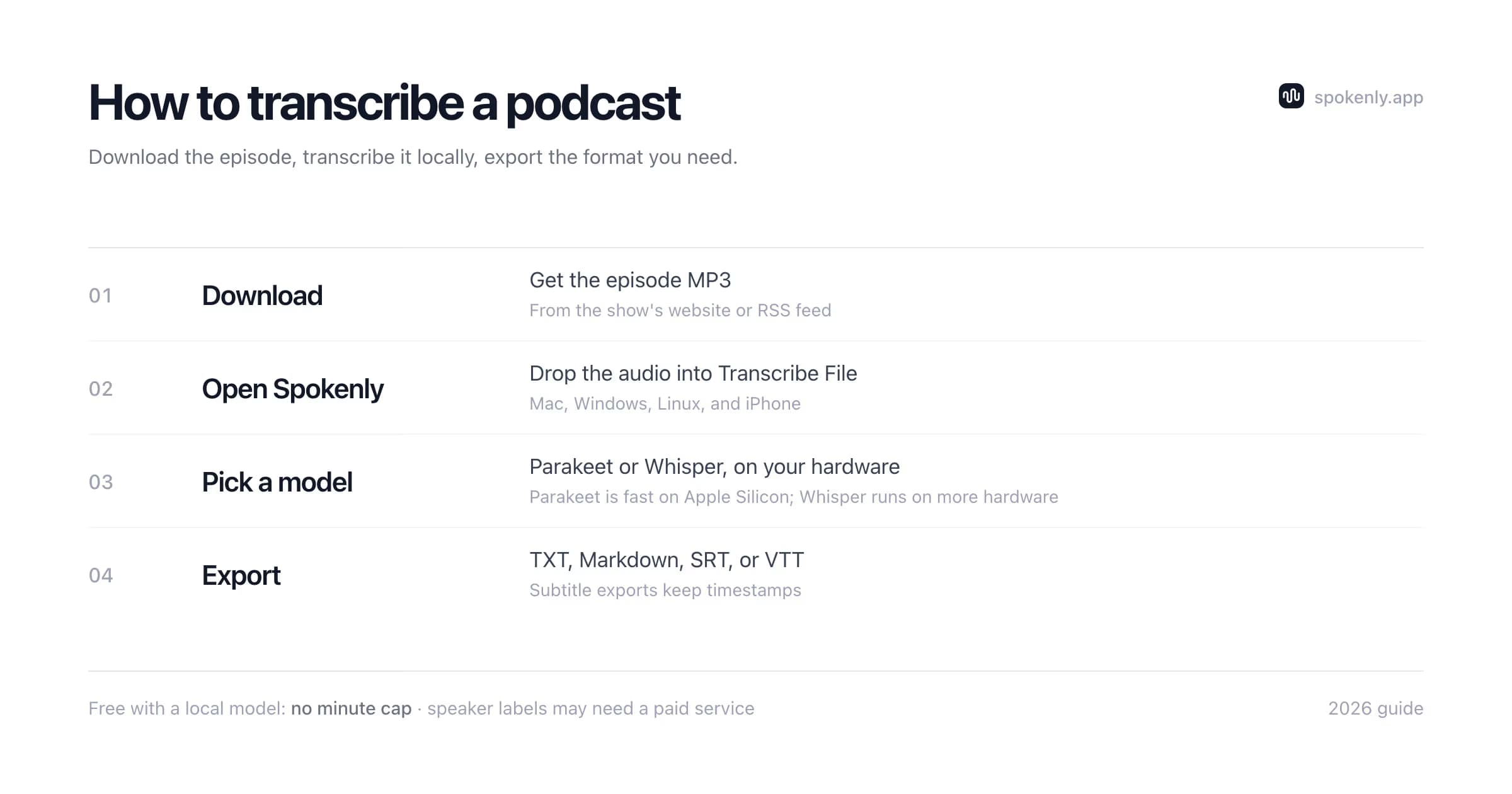
Podcasts are distributed as plain audio files, almost always MP3 or M4A, listed in a public RSS feed. Getting the file is easier than most people expect:
- 1Check the episode page on the show's website. Most players have a download icon or a direct link to the MP3.
- 2If there is no download button, open the show's RSS feed (searchable on sites like Podchaser or via the podcast's own footer link) and copy the enclosure URL for the episode.
- 3Your own episodes are even simpler: use the source file you uploaded to your host, before any ad insertion.
Exclusive shows locked inside a platform (Spotify exclusives, paid feeds) do not expose a public file. For those, use the platform's built-in transcript, or the private RSS feed your paid subscription gives you.
Check the downloaded file before a long transcription run. Confirm the duration matches the episode, play the opening and final minute, and make sure a dynamic-ad download did not return only a short preview. Use the publisher's episode page, your own host, or an authorized RSS feed rather than an unknown downloader. A private feed URL is an account credential, so do not paste it into public tools, screenshots, or shared transcripts.
Transcribe a Podcast Locally on Mac, Windows, Linux, or iPhone
With the file in hand, local transcription avoids upload limits and keeps unreleased audio on the device. Spokenly provides the same file workflow on Mac, Windows, Linux, and iPhone:
- 1Open Spokenly and choose Transcribe File from the menu bar icon.
- 2Drag the episode's MP3 or M4A into the window. On iPhone, save the episode to Files and open it in file transcription.
- 3Pick a model available on the device. Parakeet V3 is a fast multilingual option on Apple Silicon. Whisper models work across a broader range of hardware. Cloud models such as GPT-4o Transcribe and Deepgram Nova remain optional.
- 4Press Transcribe. Processing time varies with episode length, model, hardware, and audio quality.
- 5Export the result: TXT or Markdown for documents and show notes, SRT or VTT for captions and timestamped navigation, JSON for programmatic use.
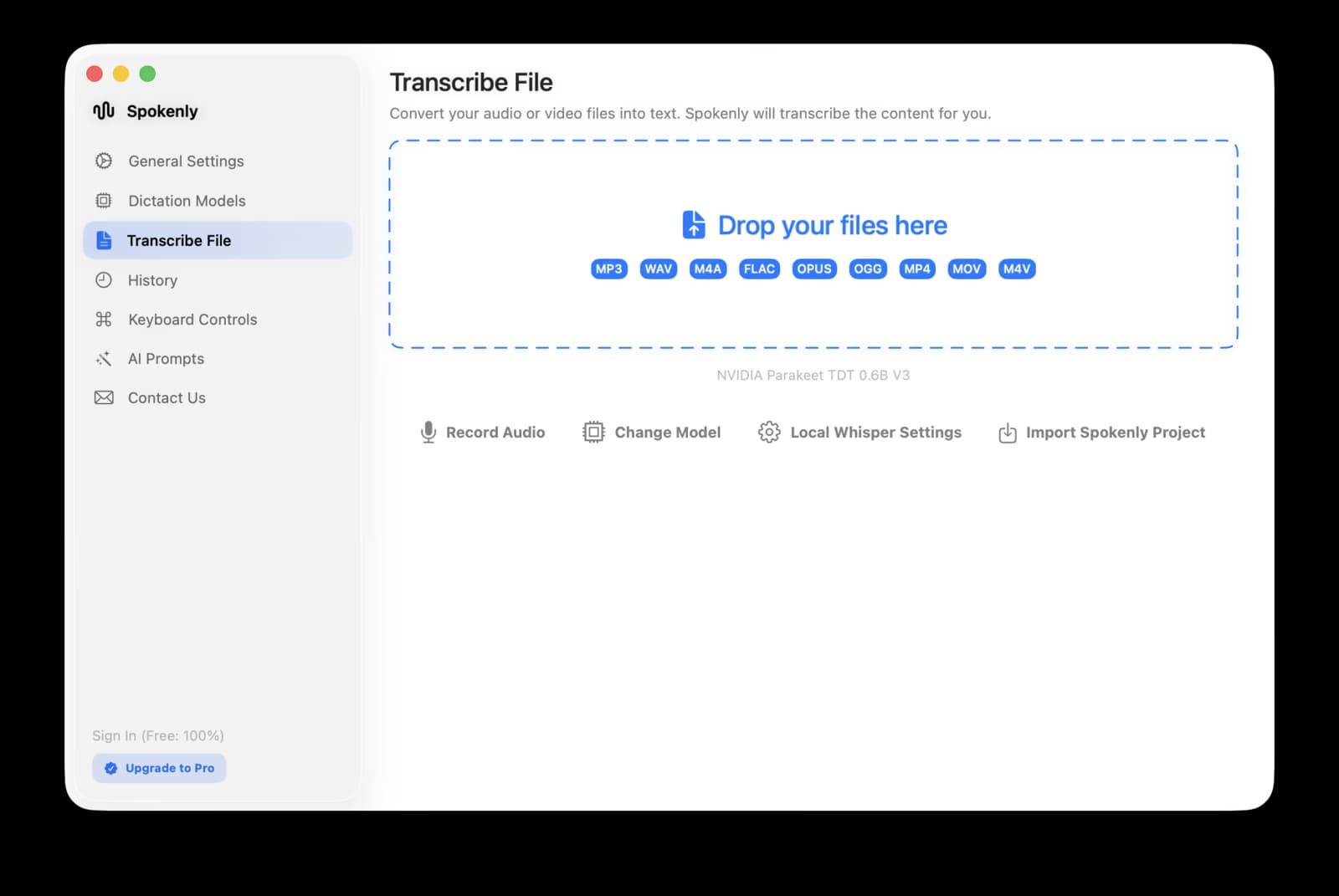
Unreleased episodes, embargoed interviews, and internal drafts can stay on the machine when a local model is selected. The open-source Whisper models trade speed and memory use for accuracy, and the Whisper model size guide maps those trade-offs to different computers.
Podcast Transcription Tools Compared
Spokenly
Mac, Windows, Linux, and iPhone. Local file transcription is free with no minute cap. Best for private episodes, archives, and multiple export formats; automatic speaker labels are limited.
MacWhisper
Mac-only local transcription with speaker recognition in paid configurations. A fit for Mac podcasters who need local diarization.
Otter
Cloud transcription with speaker labels and collaboration. The free plan has monthly, per-conversation, and import limits, so full podcast episodes often require a paid plan.
Descript
Cloud-based transcript editing plus audio and video editing. Best when the transcript is also the editing interface, rather than a final document only.
Whisper CLI
Free and local on major desktop operating systems, with full control over model and output. It requires terminal setup and provides no automatic speaker labels by itself.
Cloud allowances and plan features change, so verify the current limits before uploading a season. Other recording formats use the same audio-to-text workflow; Mac users with MP3 files can follow the MP3 transcription steps.
Speaker Labels: When You Need Diarization
Diarization means the transcript marks who is speaking: Host, Guest 1, Guest 2. For a solo show or a scripted narrative podcast it adds nothing. For interview shows and panels it is often the difference between a usable document and a wall of text.
One trade-off to name up front: speaker diarization is not Spokenly's strength. If labeled speakers are a hard requirement, the practical picks are MacWhisper Pro locally or Otter and Descript in the cloud. A budget workflow is to transcribe locally for free and hand-label the speaker changes afterwards; that is quick in a calm two-person conversation and tedious in a fast panel with crosstalk, which is where the diarization tools earn their price.
Test speaker labels on a five-minute segment with an interruption and a host handoff. A tool that separates two isolated voices may still merge speakers when they overlap or share similar pitch and microphone tone.
The interview transcription guide covers diarization tools and workflows in more depth.
Clean Up the Raw Podcast Transcript
A verbatim model output is useful for search, but a public transcript needs a focused editorial pass. Preserve what was said while removing artifacts that make the page hard to read:
- 1Confirm the episode version. Dynamic ads and later edits can make a downloaded file differ from the version a listener hears.
- 2Correct names, company names, URLs, book titles, dates, and numbers against the show notes or the recording. These are the highest-cost transcription errors.
- 3Add speaker names only after checking each change. Do not let a guessed label turn the host's words into the guest's quote.
- 4Remove false starts and repeated filler only when readability improves without changing meaning. Keep uncertainty, qualifications, and corrections that affect the claim.
- 5Retain timestamps at topic changes, ad breaks, and cited moments. They let readers verify context and jump back to the audio.
Keep the raw transcript as a separate file. It provides an audit trail if an edited sentence is challenged, while the cleaned version can use paragraphs, headings, links, and speaker labels designed for readers.
Choose the export for the next job
Markdown or HTML
Use for an episode page, show notes, a newsletter, or a searchable internal knowledge base. Keep headings semantic and link references directly.
SRT or VTT
Use for a video version, synchronized playback, or captions. Review line breaks and timestamps after editing text so captions stay aligned.
TXT
Use for a portable master copy that opens everywhere. It is simple to search and archive but carries no headings, links, or timing metadata.
JSON
Use when another tool needs timestamps, segments, or structured metadata. Preserve the schema version with the file so future scripts know how to read it.
For Podcasters: Why Publish Transcripts at All
If you make a show, a transcript is not paperwork. It is distribution:
Search traffic
Spoken content is not directly indexable like an HTML page. A transcript gives search engines crawlable text for the topics discussed and can collect specific long-tail searches after publication.
Accessibility
Deaf and hard-of-hearing listeners, plus anyone in a no-headphones situation, can follow the episode. Transcripts are also the baseline requirement in many accessibility policies.
Repurposing
Show notes, newsletter issues, quote graphics, and chapter markers all start from the transcript.
AI features
Platforms increasingly generate chapters, summaries, and search from transcripts. Supplying a clean one keeps you in control of what those systems read.
Workflow that scales: transcribe the final master locally, skim for name spellings, export Markdown for the website and SRT for the video version. If you publish subtitles, the audio to SRT guide shows the caption side of the same pipeline.
Copyright and Permission
Creating notes from a podcast and publishing its complete transcript are different uses. A full transcript can substitute for the original work, expose subscriber-only material, or reproduce a guest's protected contribution. Get the rights holder's permission before publishing a transcript of a show you do not own.
Fair use is not created by adding a source link. The US Copyright Office fair use guidance describes a case-specific analysis that considers purpose, the nature of the work, the amount used, and market effect. Other countries apply different exceptions.
For research or commentary, quote only what the purpose requires, preserve context, and link to the episode. For commercial publication, subscriber content, or a complete transcript, ask for permission or obtain legal advice. This is general information, not legal advice.
Can Plaud Transcribe Podcasts?
Yes. PLAUD audio import accepts MP3, MP4, WAV, AAC, and other common audio and video formats in the Plaud app and Plaud Web. A file can be up to five hours; longer files are split. Imported files can be transcribed and summarized without owning a Plaud recorder.
PLAUD is practical for someone already using its app, templates, and cloud allowance. The trade-off is that podcast hours consume the account's transcription minutes. A local desktop workflow is a better match for private unreleased audio, offline work, or a large back catalog because it avoids upload and minute limits.
If you are weighing the hardware itself for meetings and voice notes, the Plaud Note alternatives guide compares the recorder-plus-subscription model against doing the same job with the phone already in your pocket.
FAQ
How can I transcribe a podcast for free?
Download the episode audio file, then transcribe it with a local app. Spokenly processes podcast files free on Mac, Windows, Linux, and iPhone with local models, with no upload or per-minute charge. Model availability and processing speed depend on the device. Cloud services are useful when automatic speaker labels matter more than local processing.
Can Plaud transcribe podcasts?
Yes. The Plaud app and Plaud Web can import existing MP3, MP4, WAV, AAC, and other common audio or video files without Plaud hardware. Each imported file can be up to five hours, and Plaud then transcribes it under the account's transcription allowance. A local file transcription app is the better fit when you want offline processing or have a large archive without minute caps.
How long does it take to transcribe a one-hour podcast?
Processing time depends on the model, computer, audio quality, and whether the service has an upload queue. Fast local models on recent hardware can run much faster than real time, while large models on older CPUs can take close to the episode length or longer. Run a five-minute sample to estimate the full job on your setup.
What format should a podcast transcript be in?
Plain text (TXT) or Markdown for reading, show notes, and blog posts. SRT or VTT if you need timestamps, captions for video versions, or chapter navigation. Spokenly exports TXT, SRT, VTT, Markdown, and JSON from the same transcription (plus FCPXML on Mac), so you can generate several formats from one pass.
Is it legal to transcribe someone else's podcast?
Copyright rules depend on the jurisdiction, purpose, amount used, and effect on the original work. A private transcript for personal notes presents a different risk from publishing a full transcript. Attribution alone does not make reuse fair use. Get permission before publishing someone else's complete transcript, and seek legal advice when the intended use is commercial or uncertain.
Do Apple Podcasts and Spotify already show transcripts?
Yes, for eligible episodes. Apple listeners can search a transcript and copy up to 200 words with attribution, while creators can download transcripts in Apple Podcasts Connect. Eligible Spotify creators can download a VTT transcript in Spotify for Creators, edit it, and upload it again. Listeners can read available transcripts in the mobile app but do not get the creator export controls.
Can I transcribe a podcast on iPhone?
Yes. Spokenly for iOS transcribes audio files on the phone, including episodes saved to the Files app. For very long episodes a Mac is more comfortable, since batch processing and exports are easier to manage on a desktop.
How accurate is podcast transcription?
Modern models handle clear, well-recorded podcast audio very well. Accuracy drops with crosstalk, heavy music beds, or strong accents. Names and niche terminology are the most common misses, so budget a short cleanup pass for spellings, and a longer one if you are polishing the text into show notes.
Ready to try Spokenly?
Free to use with local models. No account required.
Download SpokenlyRead next