
Quick Answer
Tiny and Base
Fast and light, but often too error-prone for serious dictation.
Small
A practical minimum when memory is limited and you can tolerate some corrections.
Medium
A quality step up, but latency can interrupt real-time writing flow.
Large
High quality for files, heavy for interactive dictation.
Large V3 Turbo
A good first model to test for local dictation, if your app supports it.
Which Whisper Model Should You Choose for Dictation?
For dictation, the best Whisper model is the one that is accurate enough without breaking your flow. A three-second delay can slow writing more than one quick correction.
Real-time dictation
Large V3 Turbo, Small, or Medium
Pick the smallest model that keeps corrections low. Latency matters more than benchmark purity.
File transcription
Large V3 or Large V3 Turbo
Files can wait. Use a larger model when accuracy matters and processing time is acceptable.
Older Intel Mac
Small, Medium, or Turbo if it runs acceptably
Avoid assuming Large V3 will feel interactive. Test before making it your default.
Windows laptop
Small or Turbo
Thermals and memory pressure matter. A smaller model can produce a better writing flow.
English-only notes
small.en or medium.en
English-only models can be useful at smaller sizes. Large and Turbo are multilingual only.
Mixed-language dictation
Large V3 Turbo or Large V3
Use multilingual models when you switch languages or dictate names and phrases from multiple languages.
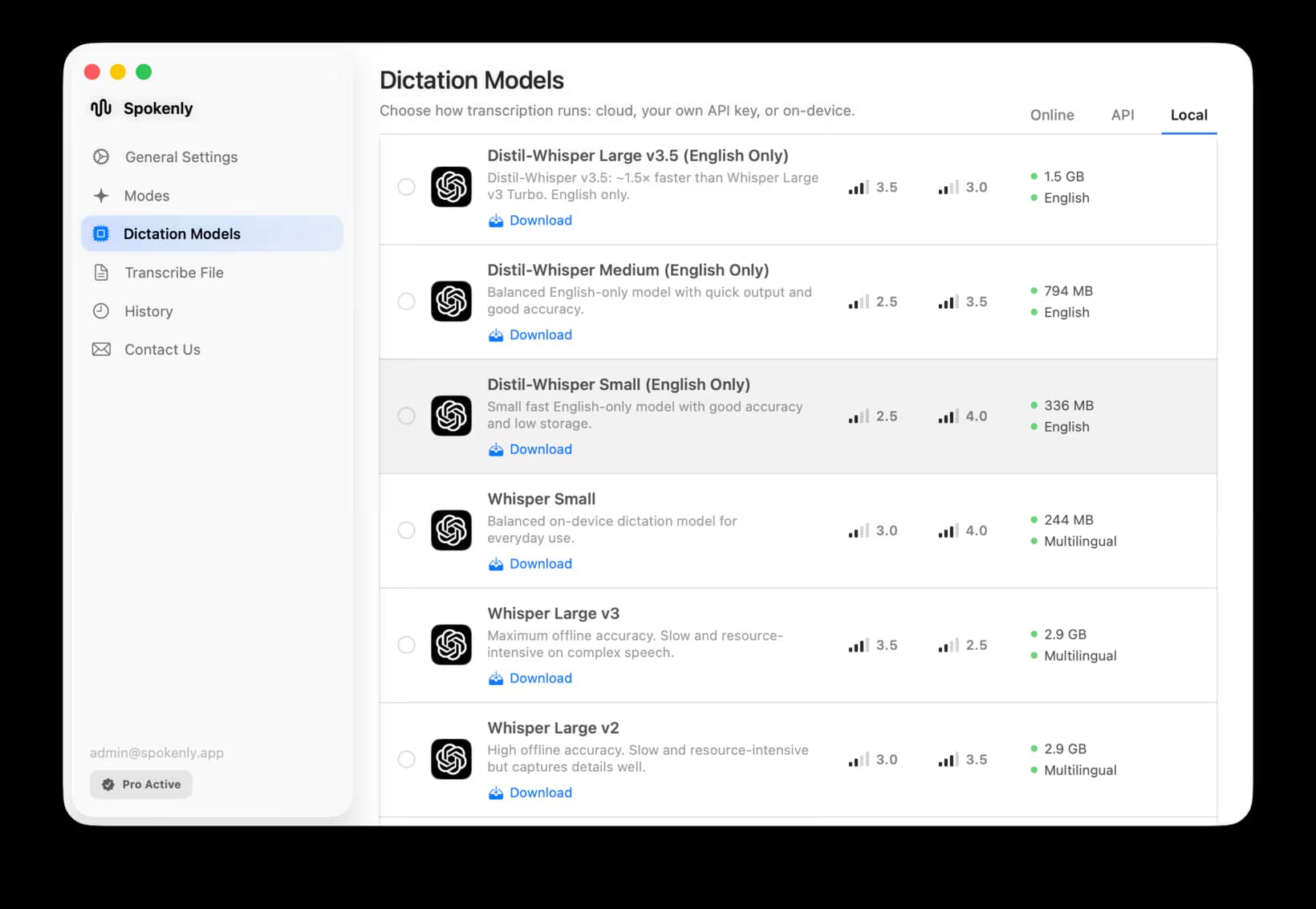
Spokenly includes local Whisper options for offline dictation and file transcription, plus cloud transcription through BYOK when you want to compare local latency against managed model quality. See the Parakeet vs Whisper comparison for the broader local-model tradeoff.
Official Whisper Model Sizes
Parameters, English-only availability, required VRAM, and relative speed are the cleanest baseline for comparing Whisper models. For dictation, those numbers matter because they affect latency, memory use, and how quickly text returns after you stop speaking.
Tiny
Parameters
39M
English
tiny.en
VRAM
~1 GB
Speed
~10x
Dictation fit
Fast tests, low accuracy ceiling
Base
Parameters
74M
English
base.en
VRAM
~1 GB
Speed
~7x
Dictation fit
Short notes on weak hardware
Small
Parameters
244M
English
small.en
VRAM
~2 GB
Speed
~4x
Dictation fit
Practical minimum for many users
Medium
Parameters
769M
English
medium.en
VRAM
~5 GB
Speed
~2x
Dictation fit
Better accuracy, noticeable latency
Large
Parameters
1550M
English
No .en model
VRAM
~10 GB
Speed
1x
Dictation fit
High quality, heavy for live use
Large V3 Turbo
Parameters
809M
English
No .en model
VRAM
~6 GB
Speed
~8x
Dictation fit
Strong default where supported
Sources: OpenAI Whisper README and OpenAI Whisper Large V3 Turbo model card.
Why Whisper Size Numbers Differ
Whisper size numbers differ because people measure different artifacts: model parameters, runtime memory, PyTorch checkpoints, Hugging Face files, Core ML conversions, and quantized local files. Use parameters for model comparison and file size for disk planning.
Parameters
Parameters describe the model itself. Tiny has 39 million parameters; Large has about 1.55 billion. This is the most stable way to compare Whisper model sizes.
VRAM
VRAM is the memory needed to run the model on a GPU. OpenAI lists rough VRAM requirements, but CPU, Metal, CUDA, and app runtime choices can change the real number.
File size
File size depends on packaging. PyTorch checkpoints, Hugging Face files, Core ML conversions, GGML, GGUF, and quantized files can all show different MB or GB values for the same model family.
Quantization
Quantized local files shrink model size and memory use by storing weights with fewer bits. That can make Whisper usable on older machines, but quality and speed depend on the conversion.
For local apps, whisper.cpp model lists are useful because they show real local model artifacts rather than only research checkpoints. Check the whisper.cpp model directory when you need file sizes for GGML or GGUF-based runtimes.
Common whisper.cpp file sizes
tiny
Multilingual file
75 MiB
English-only file
75 MiB
Quantized example
No common q5 file listed in the core list
base
Multilingual file
142 MiB
English-only file
142 MiB
Quantized example
No common q5 file listed in the core list
small
Multilingual file
466 MiB
English-only file
466 MiB
Quantized example
No common q5 file listed in the core list
medium
Multilingual file
1.5 GiB
English-only file
1.5 GiB
Quantized example
No common q5 file listed in the core list
large-v3
Multilingual file
2.9 GiB
English-only file
No .en model
Quantized example
1.1 GiB for large-v3-q5_0
large-v3-turbo
Multilingual file
1.5 GiB
English-only file
No .en model
Quantized example
547 MiB for large-v3-turbo-q5_0
Best Whisper Model for File Transcription
For audio and video files, use a larger model when accuracy matters more than wait time. Large V3 Turbo is a strong default because it is fast; Large V3 can still make sense for important files where you are willing to wait and review.
File transcription also benefits from features outside the model: subtitle export, speaker labels, batch processing, and review UI. If you are converting MP3s, see the MP3 to text on Mac guide.
Older Macs and Windows Laptops
On older hardware, do not start with the largest model just because it has the best reputation. Thermal throttling, memory pressure, and slow CPU inference can make a smaller model more useful in daily writing.
Intel Macs
Try Small first, then Medium or Turbo if latency remains acceptable. In Spokenly, Parakeet V3 is another local option on Intel Macs, while Parakeet V2 needs Apple Silicon.
Windows PCs
Test battery, fan noise, and return time, not only transcript accuracy. A quick Small model can beat a slow Large model when you are writing in bursts.
Large V2 vs Large V3 vs Large V3 Turbo
Large V3 is the full-quality modern Whisper large model. Large V3 Turbo is an optimized model intended to keep much of that quality while running far faster. For interactive dictation, Turbo is usually the better first test. For file transcription, compare both on your actual audio.
The practical rule: choose Turbo when you need fast returns, choose Large V3 when you can wait, and choose a smaller model when memory or battery life becomes the bottleneck.
Whisper vs Parakeet vs Cloud Models
Whisper is not the only local speech model worth testing. Parakeet can be faster for supported languages on Apple Silicon, while cloud models can be stronger for accents, noisy audio, punctuation, and specialized vocabulary.
Whisper
Best broad local option, especially for multilingual coverage and Intel compatibility.
Parakeet
Fast local option on Apple Silicon, with V3 covering 25 languages in Spokenly.
Cloud models
Useful when accuracy, punctuation, or vocabulary matter more than offline processing.
For fully offline work, see Spokenly's Local Only Mode.
FAQ
What are the Whisper model sizes?
OpenAI lists Tiny at 39M parameters, Base at 74M, Small at 244M, Medium at 769M, Large at 1550M, and Large V3 Turbo at 809M. Required VRAM ranges from about 1 GB for Tiny and Base to about 10 GB for Large.
What is the best Whisper model for dictation?
For dictation, Large V3 Turbo is often a good first model to test when the app and hardware support it. It is much faster than the full Large model while keeping strong accuracy. On older hardware, Small or Medium may feel better because they return text faster.
Why do Whisper model sizes in MB differ across sites?
They may be measuring different artifacts: PyTorch checkpoints, Hugging Face safetensors, whisper.cpp GGML files, GGUF files, quantized versions, or app-packaged model bundles. Parameters are more stable than file size.
Is Whisper Large V3 Turbo better than Large V3?
Turbo is optimized for speed and is a strong default for real-time transcription. Large V3 can still be useful for highest quality file transcription, but it is heavier. For dictation, the faster model often produces a better user experience.
Can Whisper run offline?
Yes. Whisper models can run locally with no network connection when the app bundles or downloads the model. Spokenly includes local Whisper options for offline dictation and file transcription.
How much RAM does Whisper need?
It depends on model size, runtime, and hardware. OpenAI lists approximate VRAM from about 1 GB for Tiny and Base to 10 GB for Large. CPU and app runtimes can use different amounts of system memory.