
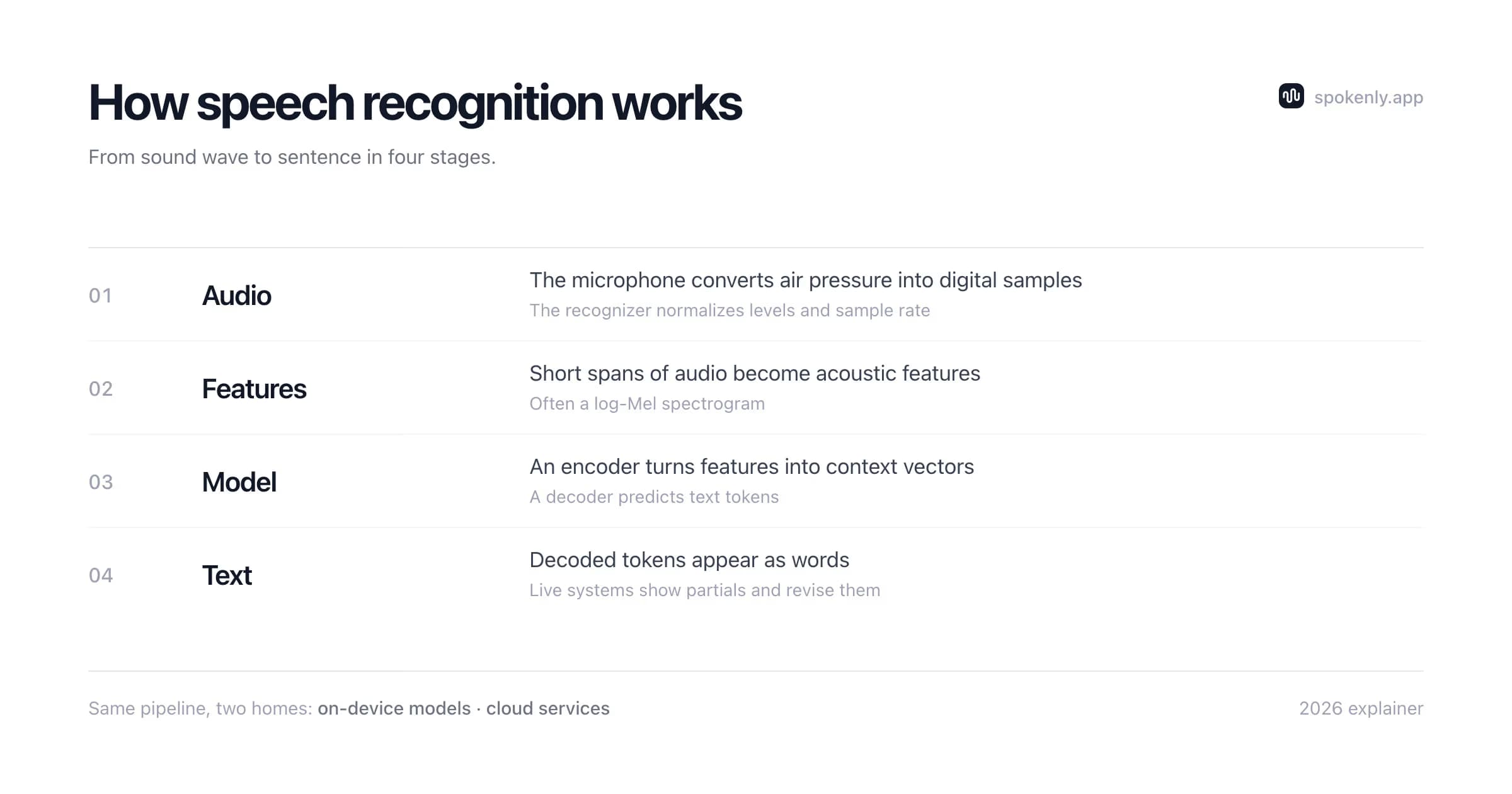
From Sound Wave to Text: The Pipeline
- 1Capture and cleanup. The microphone samples air pressure into a waveform. The system resamples it to the model's expected rate, may normalize volume, and uses voice activity detection to find speech instead of feeding long silences through the recognizer.
- 2Acoustic representation. The waveform is divided into short overlapping frames. Many systems turn these into log-Mel features that preserve how energy changes across frequency and time; some models learn a representation closer to the raw waveform.
- 3Encoding. A neural encoder combines each frame with surrounding context. Its output is not a word list but a sequence of vectors that captures sounds, timing, and clues from the wider utterance.
- 4Alignment and token prediction. CTC, transducer, and encoder-decoder systems solve the mismatch between many audio frames and fewer text tokens in different ways. Tokens may be characters, word pieces, or bytes rather than complete words.
- 5Decoding and output. The recognizer searches for a likely token sequence and converts tokens back to text. Punctuation, capitalization, timestamps, speaker labels, and style cleanup may come from the same model or from separate post-processing stages.
Streaming and batch describe when the recognizer receives context, not where it runs. A streaming model such as an RNN Transducer is designed to emit tokens as audio arrives. Other systems process rolling chunks, complete utterances, or whole files. Any of those approaches can run locally or in the cloud, and partial streaming text may change when later audio resolves an earlier ambiguity.
A short example: "book a room at two"
The microphone captures the phrase plus room noise. Voice activity detection trims quiet audio around it. The encoder uses the full phrase to represent each sound in context. That context helps the decoder prefer "two" over "to" or "too", but it cannot guarantee the choice if the sentence is cut off or the recording is unclear.
A streaming decoder may first show "book a room at" and wait for more audio before choosing the last token. A batch decoder can inspect the full segment before returning anything. If a calendar app later converts the text into an event, that is a separate language-understanding step. Speech recognition supplies the words; another system decides what they mean and what action to take.
What Changed: End-to-End Models
For decades, recognition meant hand-assembled stages: acoustic models mapping sound to phoneme probabilities, hidden Markov models handling the timing, pronunciation dictionaries mapping phonemes to words, and language models ranking word sequences. Each stage had its own errors, and improving one rarely fixed another.
Deep learning made it possible to train the major stages together. OpenAI's Whisper is an encoder-decoder transformer trained on about 680,000 hours of multilingual and multitask audio, so transcription, punctuation, language identification, and translation share one learned system. NVIDIA's Parakeet TDT uses a FastConformer encoder and token-and-duration transducer decoding, a different architecture aimed at efficient transcription.
End-to-end training reduced hand-built interfaces between stages and improved robustness on many real-world datasets, though results still depend on language, accent, noise, and domain. Efficient inference also brought capable models to consumer hardware. The practical trade-offs are covered in the Whisper model size guide and the Parakeet vs Whisper comparison.
How Speech Recognition Models Learn
Training begins with audio and a target transcript. The recording may be a clean studio sentence, a phone call, a meeting, a video clip, or speech mixed with noise. The transcript tells the model which token sequence should match the audio. Large systems learn from many languages, microphones, speakers, and acoustic settings so they can handle more than one narrow test set.
Prepare the data
Audio is resampled and paired with text. Pipelines may remove broken files, normalize transcripts, and mark language or task. Weakly supervised data can add scale, but noisy labels also teach mistakes.
Create harder examples
Training can mix in noise, change speed, mask frequency bands, or vary volume. These augmentations help the model avoid relying on one microphone or one clean recording condition.
Learn alignment
The model must connect a long stream of audio frames to a shorter token sequence. CTC, transducer, and encoder-decoder objectives handle this alignment in different ways while reducing the error between predicted and target text.
Validate on held-out audio
Developers measure word error rate on recordings excluded from training. Separate sets for languages, accents, noise, and domains reveal failures that one average score can hide.
Adapt to a domain
A general model may still miss drug names, product codes, or local place names. Fine-tuning, vocabulary biasing, prompts, and word replacements can improve a narrow workflow without retraining the whole recognizer.
A published benchmark is evidence about that model on that dataset, not a promise for every user. The same recognizer can score well on clean read speech and struggle with a distant meeting microphone. Useful evaluation repeats the exact task: your language, device, speaking style, room, and vocabulary.
Why Recognition Still Makes Mistakes
Most-likely text wins
The model outputs the most probable text for ambiguous sound. "Recognize speech" and "wreck a nice beach" genuinely sound alike; context usually saves it, but probability sometimes picks wrong.
Rare words
Names, brands, medical terms, and code identifiers appear rarely in training data, so the model substitutes something common that sounds similar. This is exactly what custom dictionaries and word replacements exist to patch.
Audio quality
Noise, distance, echo, and heavy compression can obscure frequency and timing cues. A recognizer cannot reliably recover speech detail that the recording failed to capture.
Accents and languages
Coverage follows training data and model design. Performance varies across languages and accents, and underrepresented speech patterns can produce higher error rates.
Crosstalk
When two people speak at once, their waveforms overlap. Source separation tries to recover distinct audio streams. Diarization labels who spoke when, but by itself does not untangle simultaneous voices.
Meeting systems may combine source separation, speaker counting, diarization, and speech recognition, but they remain distinct tasks. Research on online meeting analysis evaluates those stages together precisely because one does not replace another.
Decoding, Timestamps, and Speaker Labels
The neural network does not hand back one certain sentence. At each step it assigns scores to possible tokens. A greedy decoder chooses the strongest next token. Beam search keeps several candidate paths alive and compares longer sequences. Some systems also use a prompt, a vocabulary list, or an external language model to favor terms that fit the task.
More search is not automatically better. A wide beam costs time and can over-favor common phrases. A strong text prior can correct a rare sound into a fluent but wrong sentence. Confidence scores help flag uncertain spans, but scores from different models are not directly comparable unless they have been calibrated on the same kind of audio.
Punctuation and casing
Some end-to-end models emit punctuation and capital letters as tokens. Other pipelines first produce plain words and run a separate punctuation model. Either route can be wrong when a phrase supports more than one sentence boundary.
Timestamps
Segment times may come from the decoder, while word times often need an alignment pass. They are estimates, especially around pauses, music, overlapping speech, and words split into several tokens.
Speaker diarization
A diarization model groups speech by voice and time, often returning labels such as Speaker 1 and Speaker 2. It does not know a person's name unless the workflow includes enrollment or a later labeling step.
Source separation
When voices overlap, separation tries to create cleaner streams before recognition. Diarization can label turns, but it cannot recover words that remain buried under another speaker.
Summaries and action items
These are usually generated after transcription by another model. A fluent summary can repeat or amplify a transcript error, so important names, numbers, and decisions should be checked against the audio.
Generative recognizers can also produce text during silence, music, or badly clipped audio because the decoder still seeks a likely token sequence. Voice activity detection, no-speech thresholds, shorter chunks, and review of low-confidence spans reduce that risk. For legal, medical, or financial use, keep the source audio and treat the transcript as a draft until a person verifies it.
On-Device vs Cloud Recognition
The same broad pipeline can run in two places. With on-device recognition, the model lives on your computer or phone, can work offline, and runs at the speed your hardware supports. With cloud recognition, audio is sent to a provider that can host larger models and update them centrally, but the workflow needs a connection and sends audio through external infrastructure.
Location alone does not determine quality. Model architecture, training data, language coverage, quantization, audio conditions, and decoding settings all matter. Spokenly offers both paths: local Parakeet and Whisper models for on-device processing, plus optional cloud providers. The practical privacy, hardware, and setup trade-offs are covered in the offline speech-to-text guide.
The Terms Worth Knowing
ASR
Automatic speech recognition, the technical name for converting speech to text.
WER
Word error rate, calculated from substitutions, insertions, and deletions against a reference transcript. Lower is better on the same test set.
Log-Mel spectrogram
A compact time and frequency representation used as input by many speech models.
VAD
Voice activity detection, which finds speech boundaries and removes silence from the recognition workload.
Diarization
Assigning speech segments or transcript spans to speakers, often summarized as who spoke when.
Source separation
Estimating individual audio streams when voices or other sources overlap.
Streaming and batch
Emitting results while audio arrives versus processing a complete segment or file. This is separate from local versus cloud execution.
What This Means When You Dictate
- +Mic placement beats settings. Feature extraction cannot recover frequencies the microphone missed; getting closer helps more than any toggle.
- +Speak in phrases, not single words. Models lean on context; isolated words remove it and accuracy drops.
- +Fix rare words at the source. A custom dictionary entry for a name teaches the tool once, instead of correcting the same miss forever.
- +Expect homophone errors and skim for them; they are the model choosing the more probable spelling, not a glitch.
- +Pick models by audio type: fast compact models for clean dictation, larger ones for noisy or accented recordings.
FAQ
How does speech recognition work in simple terms?
A microphone turns your voice into a digital signal. The software slices that signal into tiny time steps and converts each into a numeric snapshot of the frequencies present. A neural network trained on huge volumes of spoken audio paired with text then outputs the most probable word sequence for those sounds. The same model, or an extra one, adds the rest: punctuation, capitalization, formatting.
Why does speech recognition make mistakes?
Because it predicts a likely transcript rather than reading a known answer. Homophones, names that appear rarely in training, background noise, overlapping speakers, underrepresented accents, and cut-off audio can push the prediction off course. Current models handle many of these cases better than earlier systems, but ambiguity remains when even a listener would need more context.
What is the difference between speech recognition and voice recognition?
Speech recognition converts what was said into text (dictation, transcription). Voice recognition identifies who is speaking (speaker identification, voice unlock). The terms get mixed in everyday use, but they are different tasks solved by different models.
What is WER (word error rate)?
The standard accuracy metric: the share of words the system gets wrong through substitutions, insertions, and deletions, compared against a human reference transcript. A 5% WER means roughly one error in twenty words. Comparisons only mean something on the same audio: clean audiobook speech and noisy phone calls produce wildly different WERs from the same model.
Does speech recognition understand what I mean?
Speech recognition is optimized to produce a transcript, not to verify meaning or intent. Modern models use rich linguistic context, so their output can look like understanding, and another language model may format or rewrite it. Reliable interpretation and action still require systems layered on top of the transcript.
How does speech recognition handle punctuation?
Older systems required speaking every mark ("comma", "period"). Modern models learned punctuation from their training text, so they place commas and periods from sentence rhythm and grammar automatically, and dictation tools let you speak explicit marks when you want control. Formatting beyond punctuation (paragraphs, lists, casing rules) is usually a separate post-processing step.
Which is more accurate: on-device or cloud speech recognition?
Neither location guarantees better accuracy. Cloud providers can host large models and update them centrally, while capable local models avoid network latency and can perform very well on supported hardware. Compare the exact model on audio like yours, then weigh privacy, connectivity, speed, language support, and cost.
Ready to try Spokenly?
Free to use with local models. No account required.
Download SpokenlyRead next