
Quick Answer
Daily offline dictation
Use a system-wide app with local models, hotkey capture, and clear mode switching. Spokenly adds a global dictation hotkey, local Parakeet or Whisper models, and quick switching between local, BYOK, and Pro modes.
Recorded files
Use offline transcription software that handles audio and video files, then gives you a clean review flow. Spokenly's Transcribe File tab accepts common audio and video formats and turns them into editable text.
Strict privacy
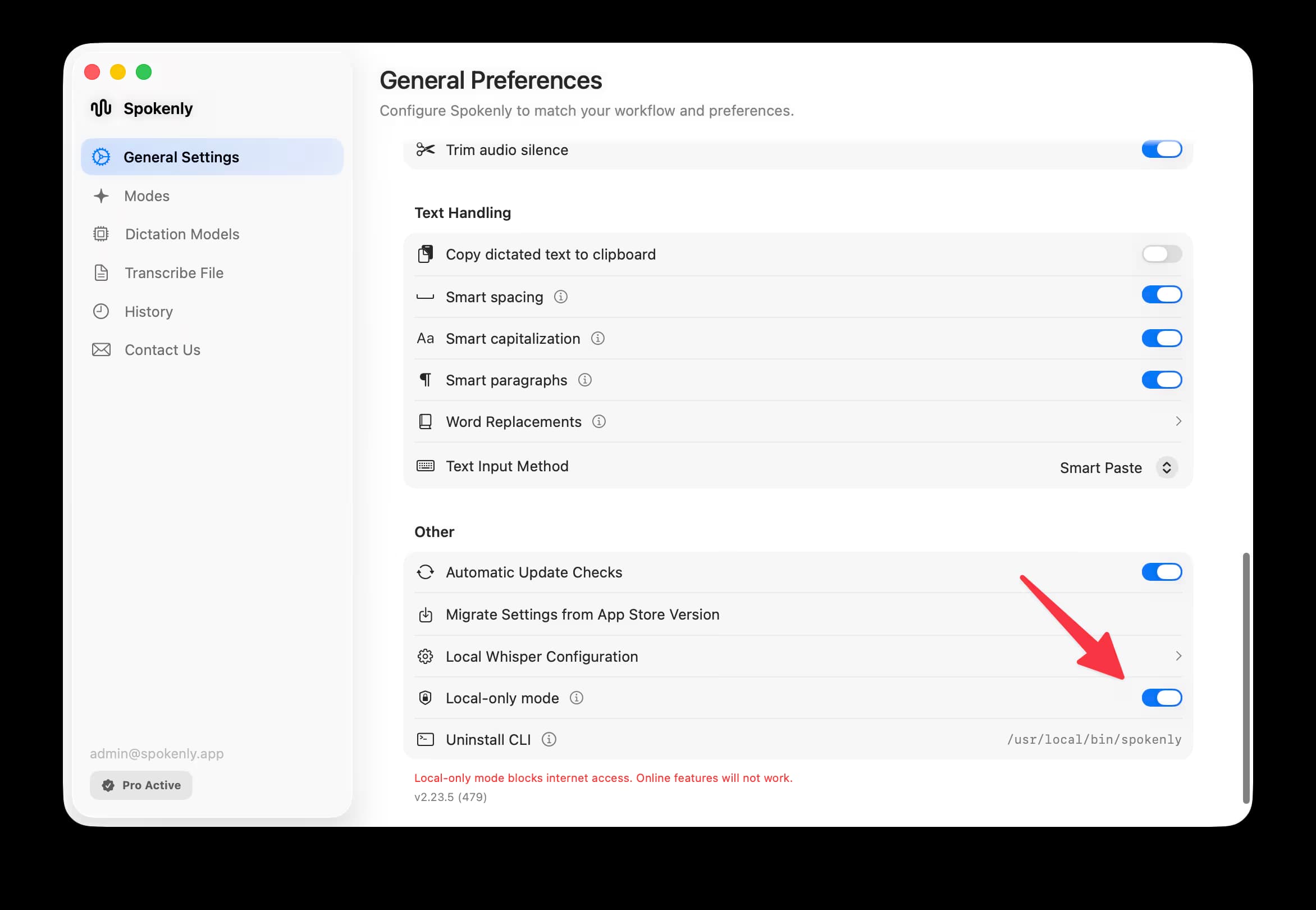
Use a local-only mode that blocks outbound requests, not only a local model setting. Spokenly Local Only Mode works with local models and blocks outbound network traffic except localhost.
Older hardware
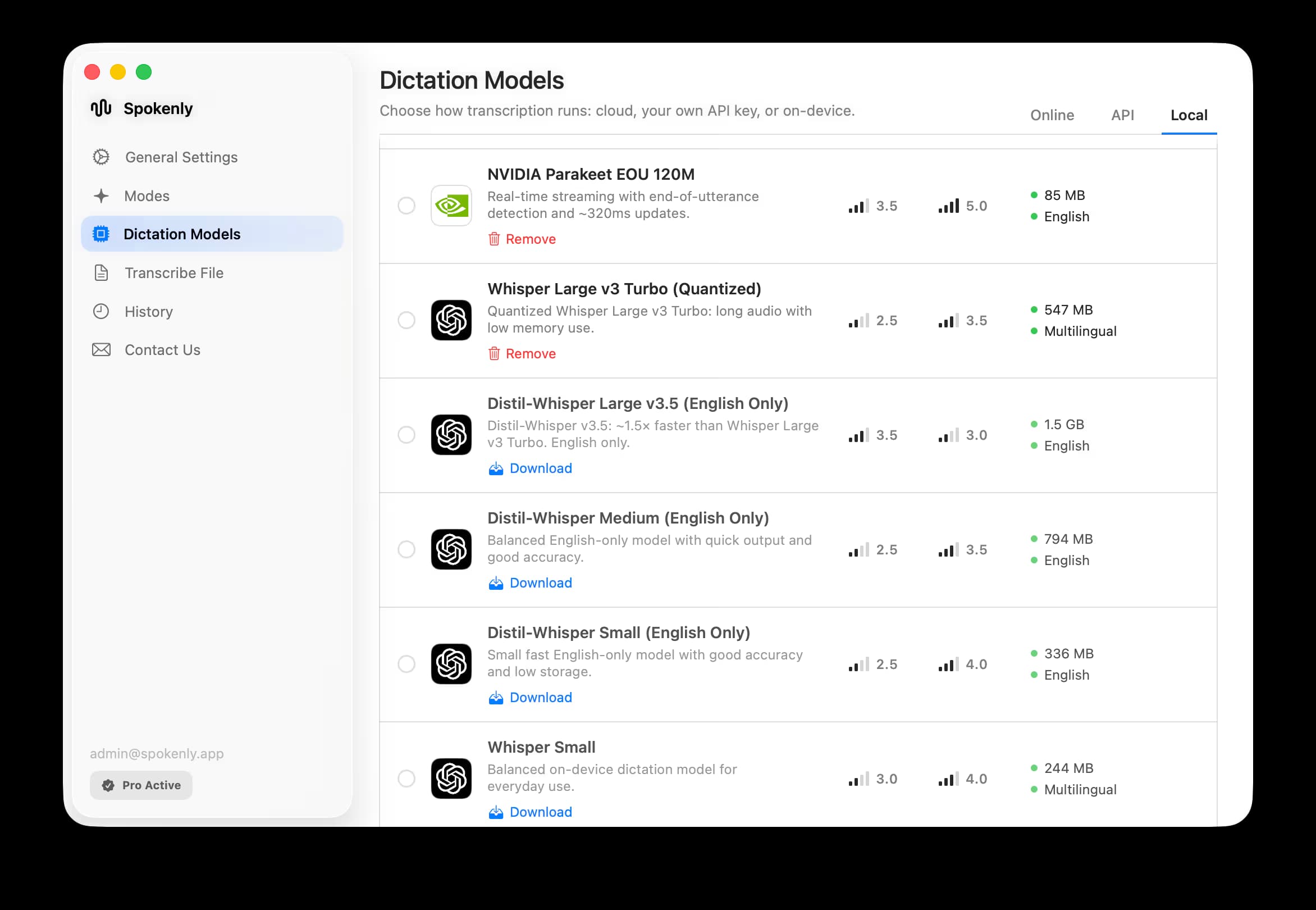
Choose smaller Whisper models first. Spokenly offers multiple local model options for different performance levels, so older machines can start with lighter Whisper models before moving to heavier models or cloud transcription.
What Offline Speech-to-Text Really Means
Offline can mean several different things. Before choosing a tool, check which layer is actually local.
Local ASR
The speech recognition model runs on the device. Audio does not need to leave the computer or phone for transcription.
Local cleanup
Formatting, punctuation, filler removal, or AI rewriting also runs locally. Many apps offer local transcription but cloud cleanup.
No network calls
A stricter mode blocks outbound requests while dictating. This matters for legal, medical, security, and client-confidential workflows.
Cloud fallback
Some apps offer local mode plus optional cloud mode. That can be useful, as long as the app clearly shows which mode is active.
Sources: OpenAI Whisper, MacWhisper, Superwhisper, OpenWhispr, and Apple Dictation.
Offline Dictation vs Offline Transcription
Offline dictation
You speak live and the text appears in another app. Latency, hotkey reliability, punctuation, and system-wide input matter most.
Offline transcription
You convert recorded audio or video files. Batch import, subtitle export, speaker handling, and review tools matter most.
Offline Speech-to-Text Software Comparison
Spokenly
Best fit
Local-first dictation and file transcription with multiple local models
Platforms
macOS, Windows, Linux, iOS
Offline notes
Local Parakeet, Whisper, and other model options, plus Local Only Mode and BYOK cloud when needed
MacWhisper
Best fit
Offline transcription software for files
Platforms
macOS, iPhone, iPad
Offline notes
Strong file workflow, local models, subtitle export
Superwhisper
Best fit
Local dictation with many model choices
Platforms
macOS, Windows, iOS
Offline notes
Local Whisper and Parakeet options, cloud providers where configured
OpenWhispr
Best fit
Open-source voice-to-text and dictation app
Platforms
Check current desktop and web app availability
Offline notes
Useful for local transcription, audio upload, and AI notepad workflows
whisper.cpp
Best fit
Developer/runtime building block
Platforms
macOS, Windows, Linux, more
Offline notes
Local Whisper runtime, not a polished dictation app by itself
Apple Dictation
Best fit
Built-in system dictation
Platforms
macOS, iOS
Offline notes
Convenient baseline, but check whether your Dictation mode is processed on-device
Mac Workflow
On Mac, first decide whether you need live dictation or file transcription. Spokenly fits system-wide dictation and local model switching. MacWhisper is stronger for recorded files. whisper.cpp is useful if you are comfortable building your own runtime.
For pure local use in Spokenly, enable Local Only Mode. For model choice, read Parakeet vs Whisper. Google's free AI Edge Eloquent app is another on-device dictation option on Mac and iPhone, with limits its review covers.
Windows Workflow
On Windows, local speech-to-text needs more than the model. The app also has to handle microphone capture, hotkeys, model download, output insertion, and updates.
Spokenly for Windows ships as a downloadable app for Windows 10 and 11. Use local Whisper when privacy matters, and switch to BYOK or Pro cloud models when accuracy is more important than offline mode.
iPhone Workflow
On iPhone, look for an app that works where you actually write. Spokenly includes an iOS custom keyboard for system-wide dictation in iOS apps, with local and cloud options depending on setup.
Privacy and Compliance Caveats
Offline speech-to-text is a privacy improvement, but it is not the whole policy. Recorded audio, transcripts, backups, logs, screenshots, model downloads, and later AI cleanup can still move data if the app is not strict about network access.
For medical or legal work, pair offline transcription with device security, retention rules, access controls, and any required organizational approval. A local ASR model alone does not make a workflow compliant.
Local Models: Whisper, Parakeet, and Apple Speech
Whisper
Good for
Broad language coverage and Intel compatibility
Watch out for
Speed and memory depend heavily on model size
Parakeet
Good for
Fast local dictation on supported hardware
Watch out for
Language and hardware support are narrower than Whisper
Apple Speech
Good for
Built into Apple platforms, low setup
Watch out for
Less control over model choice and output cleanup
Cloud fallback
Good for
Higher accuracy for some accents, noise, or vocabulary
Watch out for
Not offline, and policy depends on provider
For file workflows, see MP3 to Text on Mac, M4A to Text, and WAV to Text.
FAQ
What is offline speech-to-text software?
Offline speech-to-text software transcribes speech locally on your device instead of sending audio to a cloud service. It can be used for live dictation, file transcription, voice memos, subtitles, or private notes.
What is the difference between offline dictation and offline transcription?
Offline dictation turns live speech into text in the app where you are writing. Offline transcription converts recorded audio or video files into text. Some tools do both, but many are stronger at one workflow.
Is Whisper offline speech-to-text?
Yes, Whisper can run offline when installed locally or bundled into an app. File size, memory, and speed depend on the model size and runtime.
What is the best offline speech-to-text software for Windows?
Use a Windows app that clearly supports local transcription models and shows which mode is active. Spokenly ships on Windows 10 and 11 and supports local Whisper options, while developer users can also test whisper.cpp workflows.
Can offline speech-to-text be free?
Yes. Open models such as Whisper can run locally for free, and Spokenly is free with local models or BYOK. The tradeoff is hardware, setup, and whether you need a polished app around the model.
Is offline transcription private enough for medical or legal work?
Offline transcription helps because audio can stay on the device, but privacy is not only the ASR model. You still need retention policy, device security, backups, review process, and any required compliance agreements.