
The 3 Ways to Get Voicemail as Text
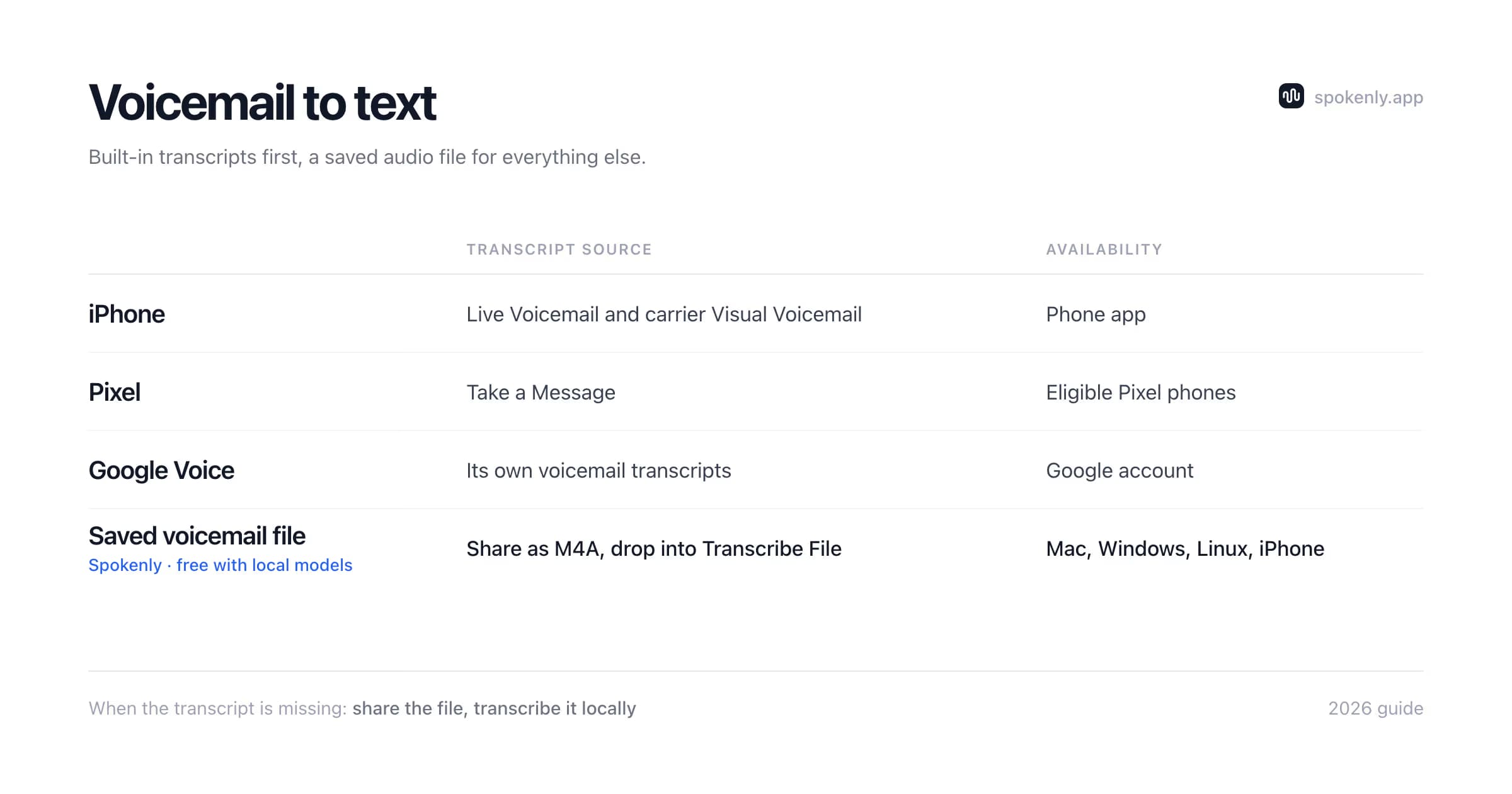
"Voicemail to text" covers three different mechanisms, and knowing which one you are dealing with saves a lot of digging through settings menus:
Phone-level transcription
The operating system transcribes messages on the device. iPhone's Live Voicemail and the Google Phone app on Pixel work this way. Free, automatic, but limited to supported languages and regions.
Carrier and number services
Visual Voicemail transcription from your carrier, or a virtual number service like Google Voice that emails you transcripts. Quality and availability depend entirely on the provider.
File transcription
You save the voicemail as an audio file and transcribe it with software you control. It handles supported formats and model languages, including old recordings and archives exported from business phone systems.
The first two depend on device, carrier, account, and region. File transcription is the most portable fallback once the message can be exported as audio, including recordings that predate the current phone.
Voicemail to Text on iPhone
iPhone has two separate transcription features, and they are easy to mix up:
Live Voicemail (iOS 17 and later)
When a call goes to voicemail, the transcript appears on your lock screen in real time while the caller speaks, and you can pick up mid-message if it turns out to matter. Apple documents it as recording a message when a call comes in. Processing happens on the device. It is on by default in supported regions and languages; if you do not see it, check Settings, Apps, Phone, Live Voicemail.
Visual Voicemail transcription
Saved messages in the Phone app's Voicemail tab show a text transcript underneath the audio player, if your carrier supports Visual Voicemail. Coverage varies by carrier and language, transcripts are marked as best-effort, and there is no export beyond copy-paste per message.
When a message shows "transcription not available", the audio still exists. Tap the message, hit Share, save it to Files, and the file transcription route below takes over.
Voicemail to Text on Android
Android separates carrier voicemail from Google's newer missed-call feature. The main routes are:
- 1Pixel Take a Message: on eligible Pixel 6 and later phones, it answers missed or declined calls, stores audio and transcripts in the Phone app Home tab, and can show the transcript while the caller speaks. It runs on-device without a data connection, but live transcription is limited to supported models, countries, and languages.
- 2Carrier Visual Voicemail: the Phone app or carrier app may show a transcript beside saved messages. Availability and settings depend on the carrier, device, and plan.
- 3Google Voice: Google Voice numbers show voicemail transcripts in the app and at voice.google.com. Email forwarding is optional, and transcript language coverage varies by account type.
- 4Carrier and OEM apps: Samsung's dialer and carrier visual voicemail apps (T-Mobile, Verizon, AT&T) each have their own transcription toggles and limits; some charge for premium tiers.
Take a Message availability lists current Pixel, country, and language requirements. Google Voice voicemail help shows where to read transcripts and control the feature.
Transcribe a Saved Voicemail File
This method handles old messages, supported languages that the carrier misses, and exports from office phone systems:
- 1Save the voicemail as audio. iPhone: Phone app, Voicemail, pick the message, Share, Save to Files (it exports as M4A). Android: most dialers offer Share or Save under each message. Business systems (RingCentral, Teams, Asterisk) email WAV or MP3 attachments.
- 2Open Spokenly on Mac, Windows, Linux, or iPhone and choose Transcribe File.
- 3Drop the voicemail in. Batch-drop a whole folder if you are clearing an archive.
- 4Pick a local model (Parakeet or Whisper) and transcribe. Nothing uploads, which matters for client calls and anything legally sensitive.
- 5Export TXT or Markdown, or copy the text straight into a CRM note, email, or case file.
Spokenly is free for this with no minute caps, and it reads the formats voicemail actually arrives in. The M4A to text guide covers the iPhone-native format in detail, and audio to text covers everything else.
M4A
Common when a voicemail is shared from iPhone. Keep the original file because forwarding services sometimes convert or recompress it.
WAV
Common in office phone systems. It can be larger than compressed formats but avoids another lossy conversion before transcription.
MP3
Common in emailed carrier and VoIP attachments. Use the file as delivered instead of recording it again through a speaker.
Name exported files with the message date and caller identifier before batch processing. The transcript may not preserve the carrier's received time or contact metadata, and generic filenames become ambiguous once messages leave the phone app.
Voicemail to Text for Business Lines
The searches for "voicemail to text software" usually come from offices: a shared line, a front desk, a support number. Realistic options, in ascending order of commitment:
- +Use the transcripts your VoIP system already generates. Most business phone platforms transcribe voicemail to email out of the box; check the admin settings before buying anything.
- +For personal use in the United States, a no-cost Google Voice number can provide voicemail transcripts. Google Voice Starter, Standard, and Premier for organizations are paid plans, so do not budget a business line as free.
- +For systems that only email audio attachments, batch-transcribe the files locally. A morning folder of WAVs becomes a searchable text log in minutes, with no per-seat subscription. This stays a manual step; if you need fully automatic transcription on every new message, a VoIP platform with built-in transcripts is the better fit.
Google documents the distinction between the no-cost personal service and paid organizational tiers in its Google Voice account types guide. Availability also varies by country.
Spokenly is not a phone system and does not answer calls; it is the transcription half of the workflow. One more business note: customer voicemails are personal data, so apply the same consent and retention rules to transcripts that you apply to the recordings themselves.
Voicemail Transcript Privacy and Retention
A voicemail can contain phone numbers, addresses, account details, health information, or a private message intended for one person. The transcript deserves the same access controls as the recording. A lock-screen preview can expose more than the missed-call notification, so review notification previews when privacy is the reason for disabling Live Voicemail or Take a Message.
On-device phone features
Live Voicemail and Pixel Take a Message process supported messages on the device. Sync, backups, screenshots, and exported files can still create additional copies.
Carrier and Google Voice transcripts
The provider processes and stores the message under its account terms. Review forwarding rules so a shared inbox does not receive transcripts unexpectedly.
Local file transcription
A local model avoids uploading the voicemail for transcription. The exported TXT or Markdown file still needs an appropriate folder, backup, and deletion schedule.
Business records
Define who can read the transcript, how long it is retained, and whether it belongs in a CRM or case system. Deleting one copy does not remove forwarded emails or downloaded exports.
How to Turn Off Voicemail to Text
A large share of voicemail-to-text searches go the other way: people who want the transcripts gone (lock-screen privacy is the usual reason). Where the switches live:
Live Voicemail on iPhone
Settings, Apps, Phone, Live Voicemail. Turn it off to send unanswered calls to the normal carrier voicemail route.
Visual Voicemail transcripts on iPhone
There is usually no separate transcript switch. Visual Voicemail itself is carrier-managed, so contact the carrier if the Phone app offers no control.
Take a Message on Pixel
Phone app, More, Settings, Take a Message, then turn Take a Message off.
Carrier Visual Voicemail on Android
Open the Phone or carrier voicemail app and check its Voicemail settings. The label and availability vary by carrier.
Google Voice transcripts
At voice.google.com, open Settings, select Voicemail, then turn Voicemail transcripts off.
Troubleshoot Missing Voicemail Transcripts
Live Voicemail disappeared
Confirm Settings, Apps, Phone, Live Voicemail. Then check Apple's current region and language availability. A carrier plan change can affect Visual Voicemail but is separate from the Live Voicemail switch.
Take a Message did not answer
The feature does not take over when the Pixel is off, out of network coverage, or roaming. Check Phone, More, Settings, Take a Message and confirm the device and country support transcription.
Google Voice shows audio without text
Open voice.google.com, Settings, Voicemail, and confirm Voicemail transcripts is on. A transcript can still be missing or incorrect when the language or audio is unsupported.
The transcript uses the wrong language
Check the language supported by the phone or account. For an exported file, select the language manually in the transcription model instead of relying on automatic detection.
An old message has no Share button
Carrier apps vary. Try the web portal, forward the message as an audio attachment, or play it through a speaker into a second recorder. Avoid screen-recording methods that capture no call audio.
Why Voicemail Transcripts Read Badly (and What Helps)
Voicemail is the worst-case input for speech recognition: telephone audio is compressed to a narrow frequency band, and callers talk fast, trail off, and rattle off numbers over background traffic. That is why a carrier transcript of a rambling message often comes out barely readable.
Three things help. First, try a stronger local or cloud model and compare the same short message before processing an archive. Second, select a model that explicitly supports the voicemail's language; model coverage varies and no option guarantees every dialect or mixed-language call. Third, replay numbers and names. No model is reliable on a phone number spoken once at speed, so treat digits in any transcript as a prompt to check the audio.
Treat transcripts as triage and records, and keep the audio itself as the reference for anything critical.
FAQ
How do I get voicemail to text on iPhone?
Two built-in ways. Live Voicemail (iOS 17 and later) shows a real-time transcript on screen while the caller is still speaking; it is on by default in supported regions. Visual Voicemail transcription appears under each saved message in the Phone app when your carrier supports it. Both are free. If a message did not get transcribed, save it as an audio file and run it through a transcription app.
How do I get voicemail to text on Android?
On eligible Pixel 6 and later phones, Take a Message can answer missed or declined calls, store the audio on the device, and show a live transcript in supported regions and languages. Carrier Visual Voicemail may also provide transcripts in the Phone app. Google Voice numbers show transcripts in the app and web interface, with optional email forwarding. Availability varies by device, carrier, account, and country.
Is voicemail to text free?
The built-in options are free: Live Voicemail and Visual Voicemail transcription on iPhone, Google Phone and Google Voice transcripts on Android. Some carriers sell premium voicemail-to-text add-ons for business lines. Transcribing saved voicemail files with local software is also free and has no monthly caps.
Can I transcribe old voicemails?
Yes. Export the voicemail as an audio file (on iPhone: open the message, tap Share, save to Files), then transcribe the file. Spokenly transcribes M4A, MP3, WAV, and most other formats locally for free, which suits legal records, business archives, and anything you need in writing.
How do I turn off voicemail to text?
On iPhone, go to Settings, Apps, Phone, Live Voicemail. On Pixel, open Phone, More, Settings, Take a Message. Carrier Visual Voicemail controls vary. For Google Voice on the web, open Settings, Voicemail, then turn Voicemail transcripts off.
Why is my voicemail not transcribing?
The usual causes: your carrier does not support Visual Voicemail transcription, the message language is not supported, the audio is too noisy or too short, or the feature is region-locked (Live Voicemail launched in English-speaking regions first). Messages that fail in the Phone app can still be saved as audio and transcribed with a third-party app, which typically handles far more languages.
Voicemail to text stopped working. How do I fix it?
Check the feature that handled the message. On iPhone, confirm Live Voicemail is enabled and contact the carrier if Visual Voicemail disappeared after an eSIM or plan change. On Pixel, confirm Take a Message is enabled and that the phone is not roaming, powered off, or out of coverage. Google Voice has a separate Voicemail transcripts switch. If you can export the audio, file transcription remains available even when the phone feature is not.
What app converts voicemail audio files to text?
A file transcription app works once the voicemail is saved as audio. Spokenly on Mac, Windows, Linux, and iPhone can process it locally for free with available Whisper or Parakeet models and export TXT, Markdown, SRT, or VTT. Language support depends on the selected model, so test a short message before processing an archive.
Ready to try Spokenly?
Free to use with local models. No account required.
Download SpokenlyRead next