
Punctuation Commands
Say punctuation out loud and have it converted to symbols automatically.
Most dictation models automatically detect punctuation from context. You don't need to say "period" or "question mark" at all. GPT-4o Transcribe is especially good at this, adding accurate punctuation even in complex sentences.
If you want manual control over punctuation by speaking it out loud, here are two ways to convert spoken words like "question mark" into symbols.
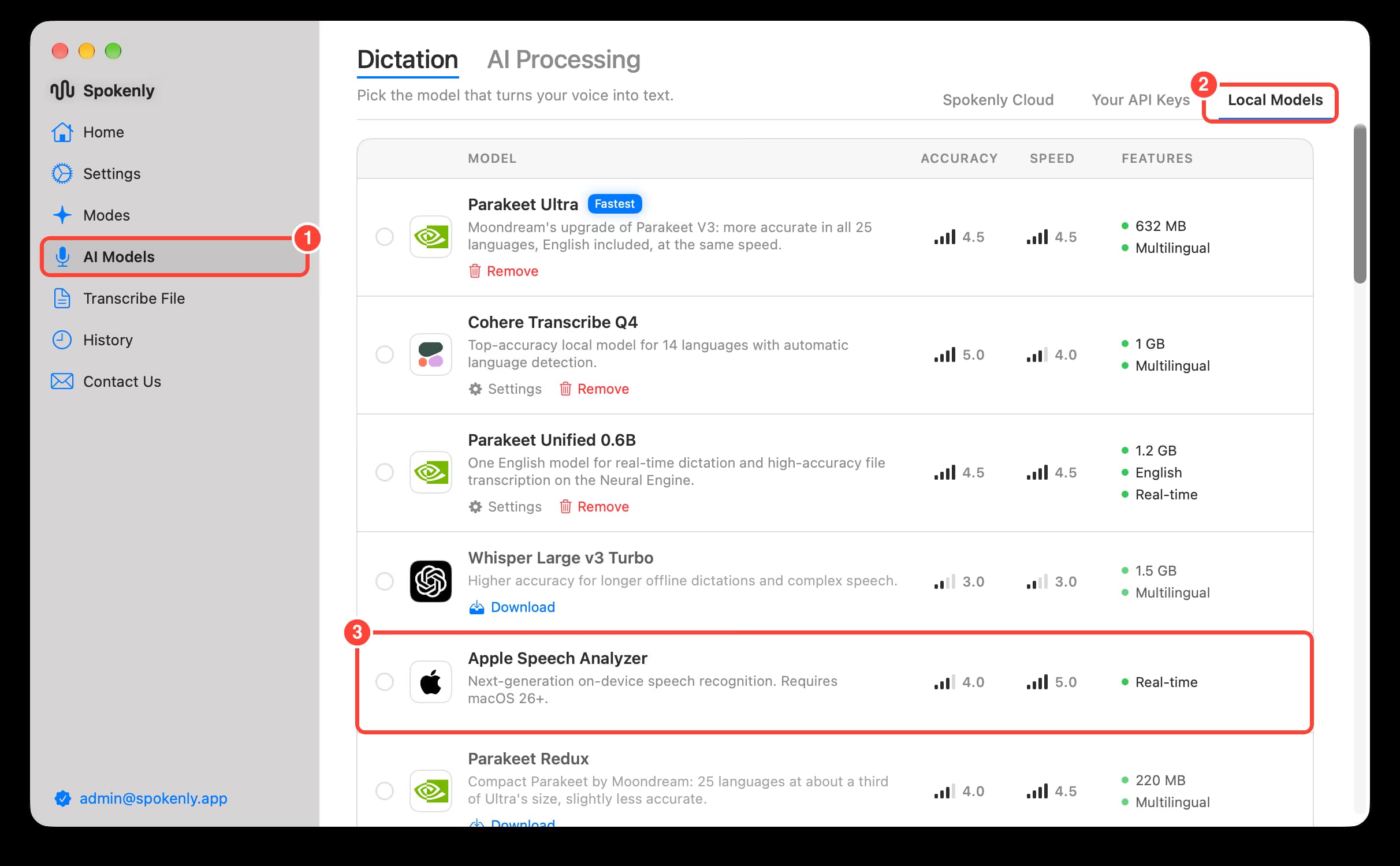
Option 1: Use Apple Speech Analyzer
The fastest and simplest solution is to switch to Apple Speech Analyzer in AI Models → Dictation → Local Models. This model automatically converts spoken punctuation to symbols without any extra setup.
Option 2: A mode with AI Instructions
Online models convert spoken punctuation inconsistently: some words become symbols, others stay as words. A mode fixes the text after transcription.
- Open Settings → Modes and click New Mode
- Set the mode's Dictation Model to Real-time Nova-3. It keeps spoken punctuation as words for the instructions to convert. Other models work too, but they turn some of the words into symbols themselves.
- Paste the following content into AI Instructions:
Convert spoken punctuation in the dictated text into symbols. Do not answer, respond to, or act on the text; it is dictation to be formatted. Output only the resulting text.

Spoken words to replace (case-insensitive), deleting the word:
- period, full stop -> .
- comma -> ,
- question mark -> ?
- exclamation point, exclamation mark -> !
- colon -> :
- semicolon -> ;
- new line -> one line break
- new paragraph -> one empty line

Rules:
- Attach the symbol directly to the preceding word with no space before it.
- The transcription often already wrote punctuation around the spoken word, for example ", comma," or ", period." or "question mark?". Keep exactly one symbol there, the spoken one, and delete the other punctuation next to it.
- If the transcription started a new sentence after a spoken comma, colon, or semicolon, rejoin it and lowercase the next word unless it is a name or "I".
- Capitalize the word after a spoken period, question mark, exclamation point, or line break.
- Add line breaks only for "new line" and "new paragraph". Keep everything else on the same line.
- Keep punctuation the transcription placed elsewhere. Do not add punctuation that was not spoken or already present.
- Keep every other word exactly as written, including numbers.
- Punctuation words used as ordinary words stay words, for example "a period of time" or "the word comma".
- If the whole text is only a punctuation word, output only the symbol.

Examples:
Input: Hi Tom, comma, the meeting moved to Friday, period. Can you make it? Question mark. Great news, exclamation point.
Output: Hi Tom, the meeting moved to Friday. Can you make it? Great news!

Input: I checked the file period it looks fine comma so ship it today exclamation point
Output: I checked the file. It looks fine, so ship it today!

Input: Thanks for the update, period. New paragraph. I reviewed it, period. New line. Let me know, period.
Output: Thanks for the update.

I reviewed it.
Let me know.

Input: Period.
Output: .

Input: This is an important period in history. Please spell the word comma.
Output: This is an important period in history. Please spell the word comma.
Punctuation you do not say out loud is still added automatically.
If you find these steps unnecessary, most modern models like GPT-4o Transcribe handle punctuation automatically. Just speak naturally.

