
Quick Answer
In a quiet room, start with the built-in MacBook, iPhone, or laptop mic. It may already be accurate enough for short notes. In a noisy room, use a USB headset with a boom mic so your voice stays close and room noise drops. For long dictation sessions, prefer a comfortable wired USB headset because battery drain and Bluetooth input switching can interrupt your flow.
Recommended Dictation Microphones
A microphone that fits your workflow beats a more expensive mic used from the wrong distance. Choose by placement, comfort, connection type, and the room where you actually dictate.
Best portable mic
DJI Mic Mini$$Best for
A compact wireless mic that works well for MacBook, desktop, phone, and mobile dictation when the mic stays close to your voice. The transmitter is 10 g, supports clip or magnet placement, and the receiver can connect to a computer as an external microphone.
Notes
It needs charging and some setup. For desk use, keep the transmitter close to your voice and avoid rubbing it against clothing.
Budget USB headset
Logitech H390$Best for
A simple wired USB-A headset for low-cost PC dictation. The useful part is the close boom mic, plug-and-play USB input, and inline mute.
Notes
Comfort and build are basic. Fine as an entry-level option, not a premium long-session headset.
Everyday office headset
Jabra Evolve2 30$$Best for
A lightweight wired office headset with a boom mic and noise-reducing microphone system. It fits people who dictate between calls and meetings.
Notes
Choose USB-A or USB-C carefully. The main advantage is consistency, not studio sound.
Long dictation sessions
Poly Blackwire 5220$$Best for
A wired office headset with USB-C, USB-A adapter, 3.5 mm support, inline controls, and a noise-canceling boom mic in the Blackwire 5200 series.
Notes
A practical work headset. Skip it if you want a desk microphone or a wireless setup.
Quiet desk setup
Blue Yeti$$Best for
A familiar desktop USB microphone for a controlled room where the mic can stay close and keyboard noise is not the main problem.
Notes
It is less forgiving than a headset if it sits far away or picks up room echo.
Medical, legal, and Dragon workflows
Philips SpeechMike Premium Touch$$$Best for
A dedicated handheld dictation microphone for Dragon, PowerScribe-style workstations, push-to-talk habits, and programmable button workflows.
Notes
Pick this class when workflow controls matter. For general AI dictation, DJI Mic Mini or a close headset is usually simpler.
If you want one flexible quality upgrade for MacBook, desk, and mobile dictation, DJI Mic Mini is the strongest first pick. Choose a wired USB headset instead when you want zero charging, zero receiver setup, and a boom mic fixed in place all day.
Check Your Current Setup First
Before buying new hardware, compare the microphones you already have. Dictate the same short paragraph with your built-in microphone, earbuds, work headset, or existing USB mic. If you have nothing external, use the built-in mic as the baseline and buy only when you can name the problem you need to solve.
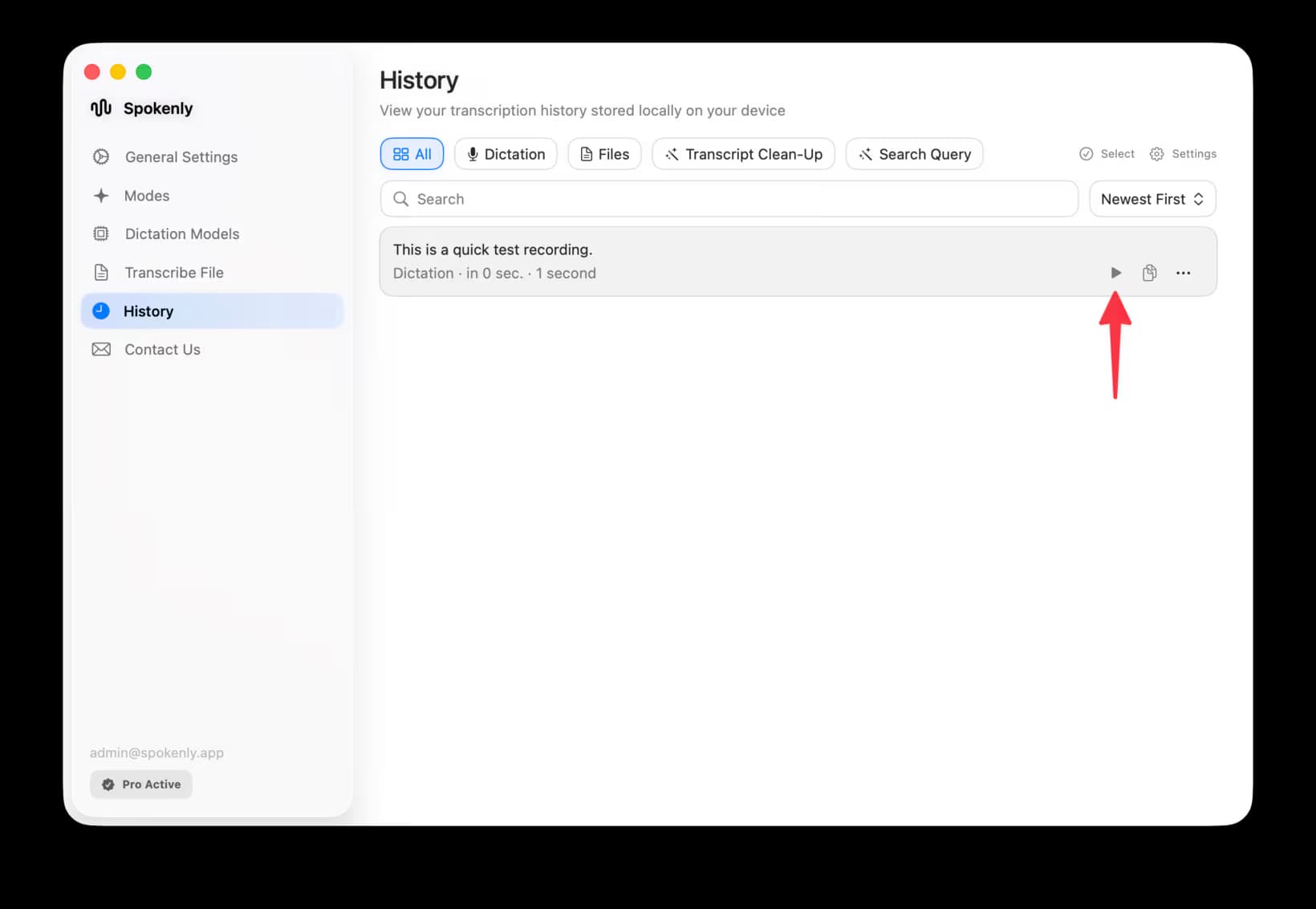
- 1Use the same room and the same speaking pace for every recording.
- 2Keep the microphone position realistic. Do not change posture just to make one mic win.
- 3Dictate into the same app and transcription model every time.
- 4Open History, press Play on the recording, and listen for distance, clipping, clothing noise, keyboard noise, and echo.
- 5Compare the transcript against the audio, then count wrong words, missed punctuation, proper nouns, and words added from background noise.
If every microphone you already own produces similar errors, new hardware may not solve the problem. Improve the room, vocabulary, and model first. Buy a new mic when the issue is clearly distance, noise, echo, comfort, or mobility.
Microphone Types
A dictation microphone is different from a podcast microphone. Speech-to-text cares about clear, consistent speech more than rich broadcast tone. Here are the practical tradeoffs.
Built-in laptop or phone microphone
Best for
Quiet rooms, short notes, mobile dictation
Avoid when
Fan noise, echo, desk distance, shared offices
Verdict
Try it first. Modern MacBook and iPhone microphones are often enough in a quiet room.
Bluetooth earbuds
Best for
Walking notes, casual dictation, calls between dictations
Avoid when
Highest accuracy, long sessions, noisy spaces
Verdict
Convenient, but battery state and input switching can make long sessions less predictable.
Wireless lavalier microphone
Best for
MacBook dictation, desk notes, phone dictation, clipped-on speech
Avoid when
You want zero battery, receiver, or Bluetooth setup
Verdict
A strong portable option when you want cleaner audio than a built-in mic without wearing a headset.
USB headset with boom mic
Best for
PC dictation, noisy rooms, long daily writing sessions
Avoid when
You dislike wearing a headset
Verdict
The most predictable default for many people who dictate every day.
Desktop USB microphone
Best for
Quiet desk setup, podcast-style speech, comfortable posture
Avoid when
Keyboard noise, room echo, changing distance from the mic
Verdict
Can sound excellent, but only if the mic stays close and the room is controlled.
Professional handheld dictation microphone
Best for
Dragon, medical workflows, radiology, legal dictation, push-to-talk habits
Avoid when
General AI dictation where a headset is enough
Verdict
Best when handheld controls, push-to-talk, and Dragon-style workflows matter.
Buying Checklist
A dictation microphone purchase should start from workflow and room conditions, not from a universal product ranking. Use these ranges as a practical filter before comparing specific models.
Budget
Basic wired USB headset
Good first upgrade for PC dictation and noisy rooms. Prioritize a boom mic and comfort over gaming styling.
Mid-range
Better wired headset
Best everyday tier for long dictation. Look for replaceable ear pads, stable USB input, and a boom mic that stays near your mouth.
Mid-range
Wireless clip-on microphone
Good for MacBook, desktop, phone, and mobile dictation when you want a small mic near your voice. Plan for charging, placement, and receiver or Bluetooth setup.
Mid-range
Desktop USB microphone
Useful in a quiet office if it can sit close. Avoid it if your keyboard, room echo, or desk distance dominates the audio.
Professional
Professional handheld dictation microphone
Only worth considering for Dragon, medical, legal, radiology, or push-to-talk workflows that use dedicated controls.
Before any purchase
Current setup check
Record the same short sample with microphones you already own. If every recording has the same errors, model choice or room acoustics may matter more than new hardware.
What Improves Dictation Accuracy
A better microphone improves dictation accuracy when it fixes a real audio problem. It helps less when the real problem is vocabulary, punctuation, language support, or model choice.
Keep the microphone close to your mouth, usually 2 to 6 inches for a headset or handheld mic.
Reduce room echo before buying expensive hardware. Curtains, carpet, and soft furniture can help.
Pick one input device and keep it selected. Many bad dictations come from the wrong microphone.
Use a consistent speaking volume. Speech models handle natural speech better than whispering or shouting.
Choose a better transcription model when vocabulary is the real problem. A better microphone cannot fix every medical term, name, or code symbol.
If your dictation app lets you switch transcription modes, record the same sample through two modes before buying hardware. This helps separate microphone problems from model problems. Spokenly users can compare local models and BYOK cloud transcription from the same app.
Mac Setup
For Apple Dictation on macOS, choose the microphone from System Settings, Keyboard, Dictation, Microphone Source. For other apps, also check System Settings, Sound, Input. Apple Dictation works from text fields in Mac apps.
For Mac dictation, start with the built-in microphone in a quiet room. If you work near a mechanical keyboard, open office noise, or conferencing audio, move to a USB headset. Desktop USB microphones can work well, but accuracy drops fast when they sit too far away.
If Apple Dictation itself is unreliable, use a separate dictation app. Spokenly works system-wide on macOS 13.3 and later, can run local models for offline mode, and can use BYOK cloud transcription when you want to compare accuracy without changing hardware.
Windows Setup
On Windows, a wired USB headset is the most predictable default. It avoids many Bluetooth mode changes and gives speech recognition a stable input level. Check the input device and microphone access before changing transcription apps.
For PC dictation, consistency matters most. A laptop microphone may be fine for short dictation, but a USB headset is more predictable when the room gets noisy, conferencing apps change audio modes, or you move away from the screen.
Spokenly for Windows is a downloadable desktop app for Windows 10 and 11. If your microphone works in Windows Sound settings but not in the dictation app, check app permissions, selected input device, and whether another conferencing app is holding the microphone.
iPhone Setup
The iPhone's built-in microphone is often reliable enough for dictation because it is close to your mouth. Use earbuds when they are more convenient, not because they make private dictation safe in a shared room.
When mobile dictation fails, the microphone is only one possible cause. The issue may be background noise, a third-party keyboard, a low-power Bluetooth state, or a transcription model that does not handle the vocabulary. Record the same phrase in the target app before replacing hardware.
If you are troubleshooting the built-in keyboard microphone, see the iPhone Dictation Not Working guide.
Medical and Dragon Dictation Microphones
Medical dictation microphones are usually about workflow control as much as sound. Dragon Medical One, PowerScribe, radiology, and EHR workstations often benefit from handheld devices with push-to-talk, programmable buttons, and a shape that keeps the mic close through repeated notes.
Dragon Medical One or PowerScribe workstation
Use a Philips SpeechMike Premium Touch or Nuance PowerMic-class handheld if the buttons, push-to-talk behavior, and workstation integration are part of the workflow.
Shared clinic or noisy room
Use a close headset or handheld mic before considering a desktop mic. Distance and room noise matter more than studio tone.
General AI dictation for clinical notes
Use a close headset or DJI Mic Mini if you do not need handheld buttons. Spend the remaining setup time on vocabulary, abbreviations, and model choice.
After hardware, tune the software: word replacements, custom dictionary, local processing mode, and transcription model. See the medical dictation software and legal dictation software pages for workflow-specific notes.
If you are tied to Dragon or PowerScribe, confirm button mapping and workstation support before buying. Audio may work as a generic microphone, but the workflow controls are the reason to buy this class of device.
Troubleshooting
Transcription suddenly got worse
Check whether the system switched from your headset to the laptop microphone. This often happens after reconnecting Bluetooth or docking a laptop.
Words are missing at the start
Wait half a second after pressing the dictation hotkey, then speak. Some Bluetooth devices need extra time to wake the input path.
Everything sounds distant
Move closer to the microphone or switch to a headset. A desktop mic across the desk often captures more room than voice.
Background noise becomes text
Use a directional boom mic, enable platform noise suppression when available, or move to a local/cloud model that handles noisy audio better.
Bluetooth quality changes between apps
Bluetooth headsets can switch audio modes when calls or conferencing apps are open. For long dictation, a wired USB headset is more predictable.
Medical or legal terms are wrong
Check the vocabulary path before replacing hardware. Add custom dictionary entries, word replacements, or use a model/provider that handles your domain vocabulary.
The microphone works, but dictation is still bad
Run the same 100-word sample through two transcription modes. If one model performs much better with the same audio, the problem is model choice.
FAQ
What is the best microphone for dictation?
For most people, the best microphone for dictation is a comfortable USB headset with a boom mic. It keeps the mic close to your mouth, rejects some room noise, and stays consistent during long writing sessions. In a quiet room, the built-in microphone on a modern MacBook or iPhone may already be enough.
Is a headset microphone better for dictation?
Usually yes. A headset keeps the microphone at a fixed distance from your mouth, which matters more than studio-style sound quality for speech-to-text. It is especially useful on a PC, in a noisy room, or when you dictate for more than a few minutes at a time.
Can I use AirPods for dictation?
AirPods and other Bluetooth earbuds can work for casual dictation in quiet spaces. For long professional sessions, a wired USB headset is often more predictable because it avoids battery drain, input switching, and Bluetooth mode changes.
Do I need a Dragon dictation microphone?
You may want a Dragon-compatible handheld microphone if your workflow depends on Dragon Professional, Dragon Medical, push-to-talk controls, or specialized clinical dictation. For general AI dictation, a good headset or built-in microphone is often sufficient.
What is the best microphone for medical dictation?
For Dragon Medical One, PowerScribe, radiology, or EHR workstation dictation, start with a handheld dictation microphone such as Philips SpeechMike Premium Touch or a Nuance PowerMic-class device. The value is not only audio quality. These microphones add push-to-talk, programmable buttons, and a shape clinicians can use repeatedly without switching between keyboard, mouse, and mic. If you do not need those controls, use a close headset or DJI Mic Mini and spend the rest of the effort on vocabulary and model quality.
Does a better microphone improve Whisper accuracy?
A better microphone can improve Whisper accuracy when the original audio is noisy, distant, clipped, or echo-heavy. It will not fix every transcription error. Model size, language, accent, punctuation handling, and domain vocabulary still matter.