
What Is Gemini 3.5 Transcribe
Gemini 3.5 Transcribe is the speech-to-text model Google announced on August 26, 2026, in public preview in the Gemini API. It ships as a pair: gemini-3.5-transcribe handles recorded audio through the Interactions API, and gemini-3.5-transcribe-live streams live audio through the Live API. Both succeed Chirp 3 at the top of Google's transcription lineup, and both already run behind Rambler on Gboard and dictation in the Gemini app on macOS.
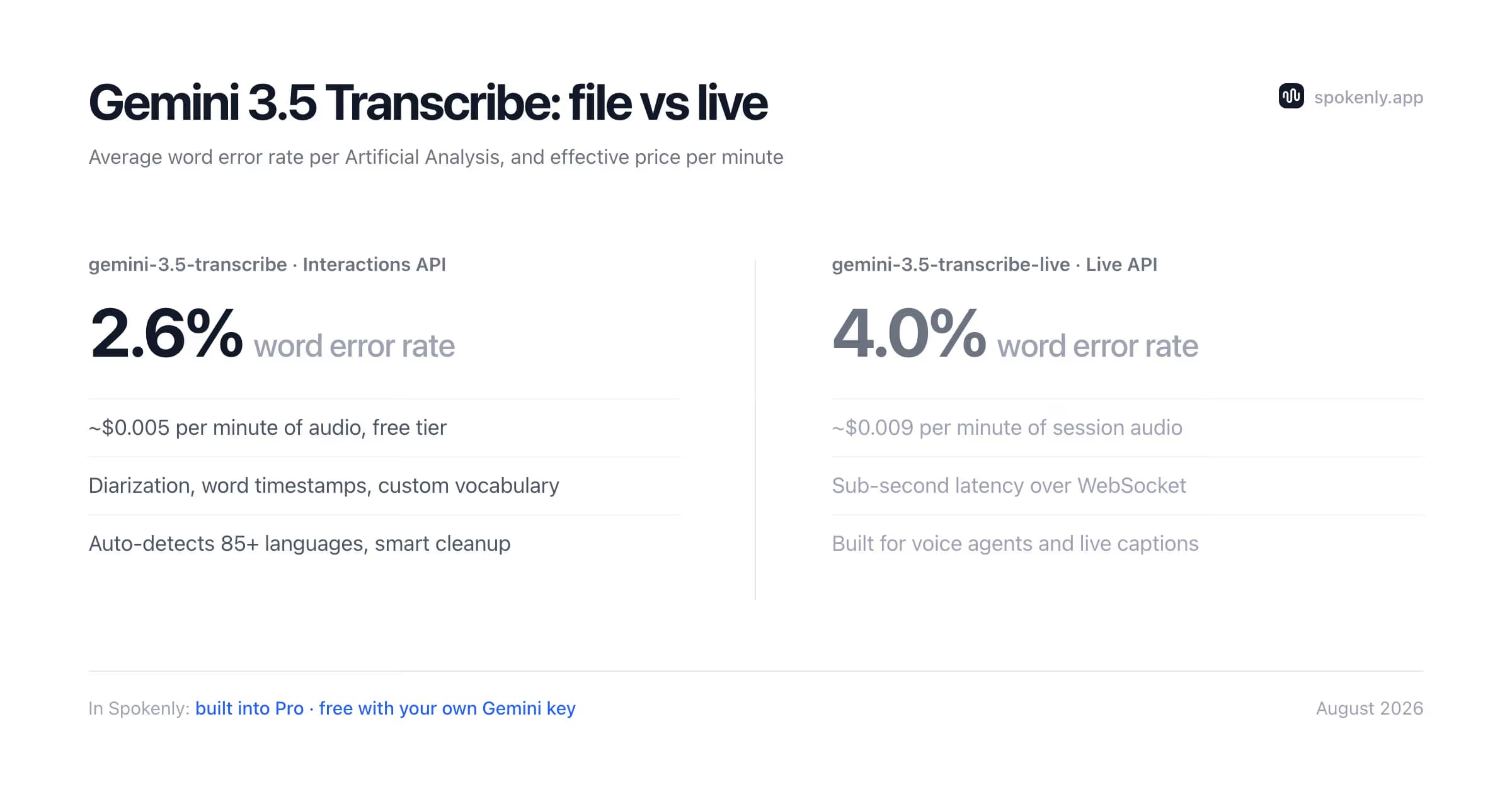
The change you notice first is smart transcription. Instead of returning speech word for word, the model drops the ums and ahs, resolves self-corrections like "let's meet Tuesday, no, Wednesday" down to the version you meant, and formats the result into clean text. Verbatim mode, the API default, keeps the raw wording when you need it. The cleanup does not trade away accuracy: Artificial Analysis measures an average word error rate of 2.6 percent for the file model and 4.0 percent for streaming, and Google reports strong results on noisy audio and alphanumeric strings like postal codes and order IDs.
The transcription docs cover the rest of the controls. Automatic language detection spans 85+ languages and follows speakers who switch language mid-sentence, a language_codes field pins the expected ones, and custom_vocabulary biases recognition toward up to 1,000 domain terms and names. Speaker diarization labels up to eight speakers, with attribution for three or more marked experimental, and word-level timestamps return start and end offsets for every recognized word.
Gemini 3.5 Transcribe Pricing
Gemini bills transcription by tokens rather than flat minutes: audio input costs $2.00 per million tokens and text output $12.00 per million. The official pricing page translates that into an effective blended rate of about $0.005 per minute of audio, assuming 25 audio tokens per second in and about 175 text tokens per minute out, so an hour of dictation runs roughly 30 cents. The live model bills $3.50 per million audio tokens in and $21.00 per million text tokens out, about $0.009 per minute of session audio. Both models also carry a free tier, with the exact caps shown in your Google AI Studio account.
gemini-3.5-transcribeRecorded audio and dictation · ~$0.005/min
2.6% average word error rate per Artificial Analysis, plus diarization, word timestamps, custom vocabulary
gemini-3.5-transcribe-liveReal-time streaming · ~$0.009/min
Sub-second latency over WebSocket via the Live API, 4.0% Artificial Analysis word error rate
OpenAI's hosted transcription models have no free tier, which makes Gemini the cheaper of the two to trial. For a wider sweep of no-cost options, the roundup of free speech-to-text APIs covers what Groq, Deepgram, and others give away, and Whisper run locally costs nothing at all.
Gemini 3.5 Transcribe vs Chirp 3 and GPT-Transcribe
Against Chirp 3, its predecessor, the published gains are accuracy, speed, and the shape of the output. On the multilingual FLEURS benchmark, Google reports 5.50 percent word error rate in streaming mode and 5.04 percent non-streaming, improving on Chirp 3, and Artificial Analysis clocks time to final transcription improving by 70 percent. The clearest break is smart transcription: Chirp 3 returned speech as heard, while the new model cleans up disfluencies and formats the result. Speaker diarization and 1,000-phrase custom vocabulary are not new, though: Chirp 3 already offered both.
The closer comparison is GPT-Transcribe, the model OpenAI shipped a month earlier. For recorded audio the prices nearly match: about $0.005 per minute for Gemini against $0.0045 for OpenAI. Streaming splits them: Gemini's live model at about $0.009 per minute costs roughly half of OpenAI's gpt-live-transcribe at $0.017. Gemini also returns word timestamps and speaker labels from one model; OpenAI still splits that work between whisper-1 and gpt-4o-transcribe-diarize. And Gemini's free tier has no OpenAI counterpart.
Both vendors share one caveat: audio leaves your machine for Google's or OpenAI's servers. If that rules cloud transcription out, the Parakeet vs Whisper comparison measures how far on-device engines get with no network.
How to Use Gemini 3.5 Transcribe in Spokenly
Two routes lead to Gemini 3.5 Transcribe in Spokenly, both available on macOS, iOS, and Windows. Either way the model sits behind a system-wide hotkey, and the cleaned-up text arrives at the cursor of whatever app has focus.
Route 1: built into Spokenly Pro
Select Gemini 3.5 Transcribe in Spokenly's model list, in the Most Accurate category. No Google account, no API key, no token math; usage is covered by the Pro subscription. This route still sends audio to the cloud, through Spokenly's backend to Google. For dictation that never reaches a server, Spokenly's local models with Local Only Mode keep everything on-device.
Route 2: bring your own API key
Bring-your-own-key works on Spokenly's free plan with no word caps. Create a key in Google AI Studio, open Spokenly's model settings, choose the Google Gemini provider, and paste it. Spokenly preselects gemini-3.5-transcribe, so nothing else needs configuring, and light dictation can fit inside the API's free tier before token billing starts.
Spokenly's settings reach the model's controls on both routes: Smart Mode switches between polished and verbatim output, a language hint overrides auto-detection when it guesses wrong, and a key terms list feeds custom_vocabulary so names and jargon come out spelled right. On top of that, Spokenly layers its own word replacements, AI formatting prompts, and MCP integration that pipes dictation into Claude Code, Cursor, and Codex.
The Live Model for Streaming
The second launch model, gemini-3.5-transcribe-live, targets live audio. It holds a bidirectional WebSocket session through the Gemini Live API and returns continuous transcription with sub-second latency. That fits voice agents, captioning, and any dictation interface that shows words as they are spoken. Accuracy stays close to the file model at a 4.0 percent Artificial Analysis average, and at about $0.009 per minute of session audio it runs roughly half the price of OpenAI's realtime model.
Spokenly's Gemini routes currently use the file model, which is why the transcript appears a few seconds after you stop rather than while you speak. When live text matters more than Gemini's cleanup, Spokenly's streaming options cover it: gpt-live-transcribe through an OpenAI key, or Soniox Realtime built into Pro.
Picking the Right Model
Everyday dictation and notes
gemini-3.5-transcribe. The 2.6 percent Artificial Analysis average makes it the default pick. Smart transcription strips filler words, and custom vocabulary keeps names, jargon, and product terms spelled right.
Live captions and voice agents
gemini-3.5-transcribe-live. It streams continuous transcription with sub-second latency, at about half the per-minute price of OpenAI's realtime model.
Meeting recordings with multiple speakers
gemini-3.5-transcribe with diarization. It labels up to eight speakers; Google marks attribution for three or more as experimental.
Subtitles and caption files
gemini-3.5-transcribe with word-level timestamps. Start and end offsets for every word cover SRT and VTT timing, though Google notes timestamps can cost some accuracy.
Private or offline transcription
Skip the cloud entirely. Spokenly's local Parakeet and Whisper models run on your machine for free, with no audio leaving the device.
Gemini 3.5 Transcribe FAQ
What is Gemini 3.5 Transcribe?
Gemini 3.5 Transcribe is Google's speech-to-text model announced on August 26, 2026, in public preview in the Gemini API. The gemini-3.5-transcribe model handles recorded audio through the Interactions API, and its streaming companion gemini-3.5-transcribe-live handles live audio through the Live API. The models auto-detect 85+ languages, remove filler words, resolve self-corrections, and format the output, succeeding Chirp 3 as Google's flagship transcription models.
How much does Gemini 3.5 Transcribe cost?
Billing is per token: audio input costs $2.00 per million tokens and text output $12.00 per million, which Google's pricing page translates to an effective rate of about $0.005 per minute of audio, or roughly 30 cents per hour. The streaming model gemini-3.5-transcribe-live works out to about $0.009 per minute. Both models also have a free tier.
Is Gemini 3.5 Transcribe better than Chirp 3?
On the multilingual FLEURS benchmark, Google reports 5.50 percent word error rate in streaming mode and 5.04 percent non-streaming, improving on Chirp 3, and Artificial Analysis measures time to final transcription improving by 70 percent. The visible difference is smart transcription: filler removal, self-correction cleanup, and formatting that Chirp 3 did not do. Speaker diarization and 1,000-phrase custom vocabulary carry over from Chirp 3.
What is the difference between Gemini 3.5 Transcribe and GPT-Transcribe?
Both are the current flagship transcription models of their vendors, and Spokenly supports both. For recorded audio they cost about the same, $0.005 versus $0.0045 per minute. For streaming, Gemini's live model at about $0.009 per minute is roughly half the price of OpenAI's gpt-live-transcribe at $0.017. Gemini also returns word-level timestamps and speaker labels from one model, work OpenAI splits between whisper-1 and gpt-4o-transcribe-diarize, and it has a free tier while OpenAI's transcription API has none.
What is gemini-3.5-transcribe-live?
gemini-3.5-transcribe-live is the streaming companion model, served through the Gemini Live API over a bidirectional WebSocket connection. It returns continuous transcription with sub-second latency for voice agents and live captioning, averages 4.0 percent word error rate on Artificial Analysis, and costs about $0.009 per minute of session audio.
Can I use Gemini 3.5 Transcribe for free?
The Gemini API includes a free tier for both transcription models; the exact caps show in your Google AI Studio account. Spokenly's bring-your-own-key route costs nothing either: add a Gemini API key on Spokenly's free plan and dictate without word caps, paying Google only for usage beyond its free tier. For fully free transcription, Spokenly's local Parakeet and Whisper models run on-device without limits.
Which languages does Gemini 3.5 Transcribe support?
The model auto-detects more than 85 languages and handles code-switching, where the speaker changes language mid-sentence. You can pin expected languages with BCP-47 codes through the language_codes parameter, and bias recognition toward names and jargon with up to 1,000 custom vocabulary phrases.
Does Spokenly support Gemini 3.5 Transcribe?
Yes. Spokenly Pro includes Gemini 3.5 Transcribe as a built-in model in the Most Accurate category with no API key needed. On the free plan, add your own Gemini API key from Google AI Studio and Spokenly uses gemini-3.5-transcribe as the default model for the Google Gemini provider. Both routes work on macOS, iOS, and Windows.
Does Gemini 3.5 Transcribe support speaker labels or timestamps?
Yes, for pre-recorded audio through the Interactions API. Speaker diarization labels up to eight speakers, and Google marks attribution for three or more as experimental. Word-level timestamps return start and end offsets for every recognized word, enough to build subtitle files, though Google notes that enabling them can cost some transcription accuracy.