

Spokenly for iPhone & iPad
Dictate on iPhone.
In every app.
Voice typing in Messages, Mail, Notes, Slack, and ChatGPT with the Spokenly keyboard or Background Dictation. Free offline models, your own API keys, or Spokenly Cloud.
Free · No ads · iOS 16.4 or later
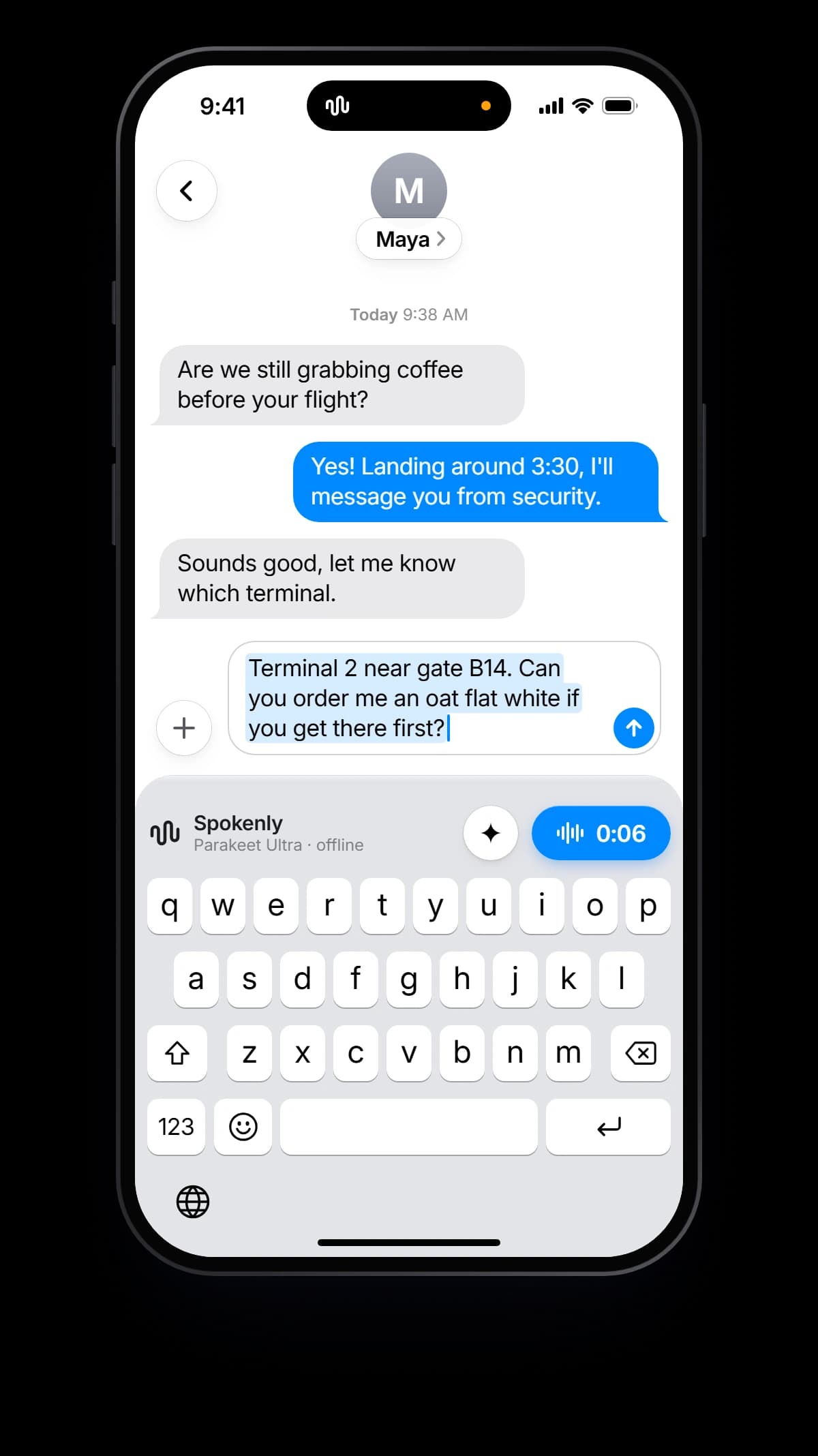
Keyboard and Background Dictation
Dictate at the cursor with the Spokenly keyboard (Full or Voice layout), or use Background Dictation with any keyboard.
- The Full layout adds letter keys and swipe typing
- Start Background Dictation from the Action Button, Back Tap, or AssistiveTouch
- In password fields, iOS switches to its own keyboard


On-device or cloud speech to text
- Local Models: Parakeet (Ultra, V3, Unified), Cohere Transcribe Q4, Nemotron 3.5, Whisper, and Apple Speech Analyzer run offline on your device. Free, no account needed
- Your API Keys: OpenAI, Groq, Deepgram, ElevenLabs, OpenRouter, AssemblyAI, and more. You pay the provider directly, with no Spokenly fee
- Spokenly Cloud: 100+ languages with the free trial or Pro. Local-only mode blocks all cloud requests
um running late uh be there in ten
Running late. Be there in ten.
AI modes, Apple Intelligence, and files
Modes clean up, rephrase, or translate what you dictate. Apply Mode does the same to text you already typed.
- Run modes with Apple Intelligence (iOS 26 on supported devices), your own AI key, or Spokenly AI
- Share a Voice Memo or any audio or video file to Spokenly to transcribe it
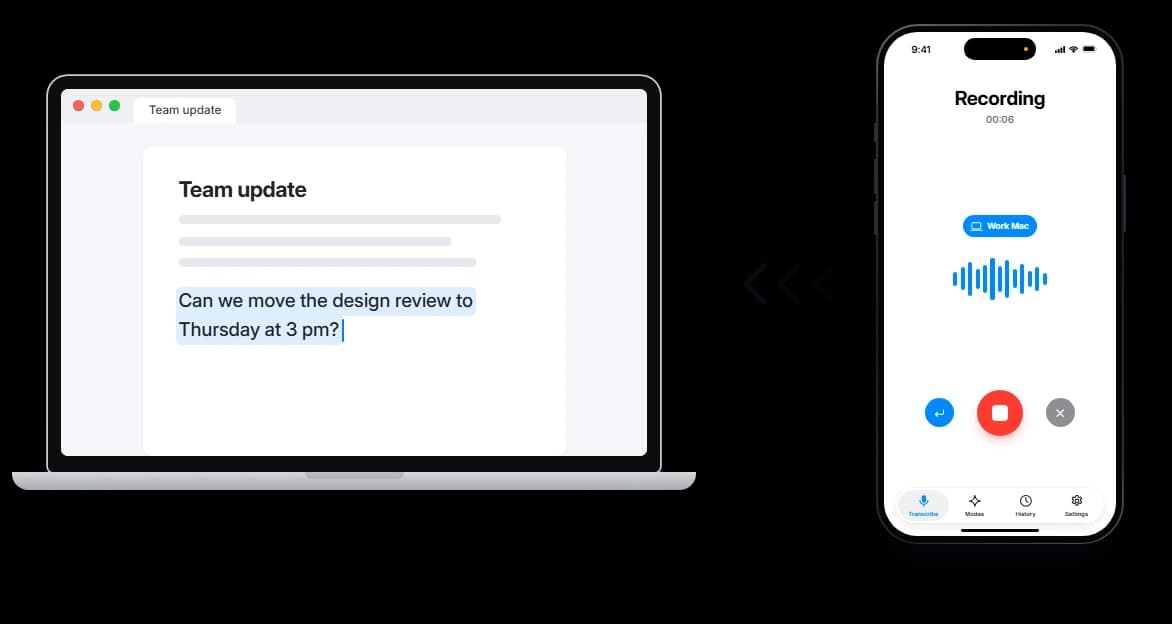
Dictate from iPhone and Apple Watch to your computer
Turn your iPhone, iPad, or Apple Watch into a wireless microphone for Spokenly on Mac, Windows, or Linux. Speak, and the text appears at the cursor on your computer. The iPhone stays connected while Spokenly is in the background, and the Apple Watch sends audio through its paired iPhone. With the Mac App Store version, press ⌘V on the Mac to paste the text.
Sign in with the same email on both devices and keep both online. On the Free plan, each dictation uses 1% of the one-time free trial. Local+ and Pro have no limit.
Frequently Asked Questions
More answers in the documentation.
Does the Spokenly keyboard work in every iOS app?
In almost every app. After you add it in iOS Settings and turn on Allow Full Access, the Spokenly keyboard works in Messages, Mail, Notes, Slack, Notion, ChatGPT, Claude, Safari, and any other app that allows third-party keyboards. In password fields, iOS switches to its own keyboard.
Is Spokenly for iPhone free?
Yes. Spokenly is free to install, with no ads and no account required. Local models are free. With your own API keys, you pay your provider directly and Spokenly adds no fee. The Spokenly keyboard has the same features on every plan. Local+ is a one-time purchase on spokenly.app that adds unlimited Mobile Dictation and settings sync. Pro adds Spokenly Cloud and hosted AI.
How do I install the keyboard and why does it need Allow Full Access?
Install Spokenly from the App Store. In iOS Settings, open General > Keyboard > Keyboards > Add New Keyboard and tap Spokenly, then turn on Allow Full Access. With Full Access, the keyboard records by itself for supported cloud models and hands other dictations to the Spokenly app. To dictate without Full Access, turn on Live Activities and use Background Dictation. It copies the text to your clipboard, and you paste it with any keyboard.
Will my dictations stay private on iPhone?
With a local model (Parakeet, Cohere, Whisper, or Apple Speech Analyzer), audio stays on your iPhone. Local-only mode also blocks cloud models, cloud AI providers, and sync. With a cloud model, audio goes to the provider you chose: directly with your own API key, or through Spokenly with Pro. Spokenly does not store your audio or transcripts on its servers.
What iOS version is required, and does it work on iPad and Apple Watch?
Spokenly needs iOS 16.4 or later and runs on iPhone and iPad. Background Dictation and the Parakeet and Nemotron local models need iOS 17, Cohere Transcribe Q4 needs iOS 18, and Apple Speech Analyzer needs iOS 26. The Apple Watch app (watchOS 10 or later) sends audio through its paired iPhone, which transcribes it or passes it on to your computer.
Does Spokenly for iPhone work with the Mac, Windows, and Linux apps?
Yes. Sign in with the same email on iPhone, iPad, Mac, Windows, Linux, Android, and the Chrome extension, and your Pro subscription works on all of them (for App Store purchases, see spokenly.app/docs/sync-subscription). With the same sign-in, Mobile Dictation sends your voice from the iPhone or Apple Watch to your computer.
Try Spokenly on iPhone
Free with offline models and your own API keys. No account required.

Scan to install
Spokenly also runs on Mac, Windows, Linux, and Android, and as a Chrome extension.

