
Quick Answer (TL;DR)
For most Mac users in 2026, the best speech-to-text setup is Spokenly with GPT-4o Transcribe (cloud) or Parakeet V3 (local) on Apple Silicon. Apple Dictation is fine for short replies but its 15-18% word error rate, 60-second cutoff, and ~50 language list lag modern alternatives by a wide margin. Spokenly is free, works in any Mac app, and supports 100+ languages with cloud or fully offline transcription.
For file transcription (MP3, M4A, podcasts), see MP3 to text on Mac. For real-time dictation issues, see Mac dictation not working.
Skip Apple: Use Spokenly Instead
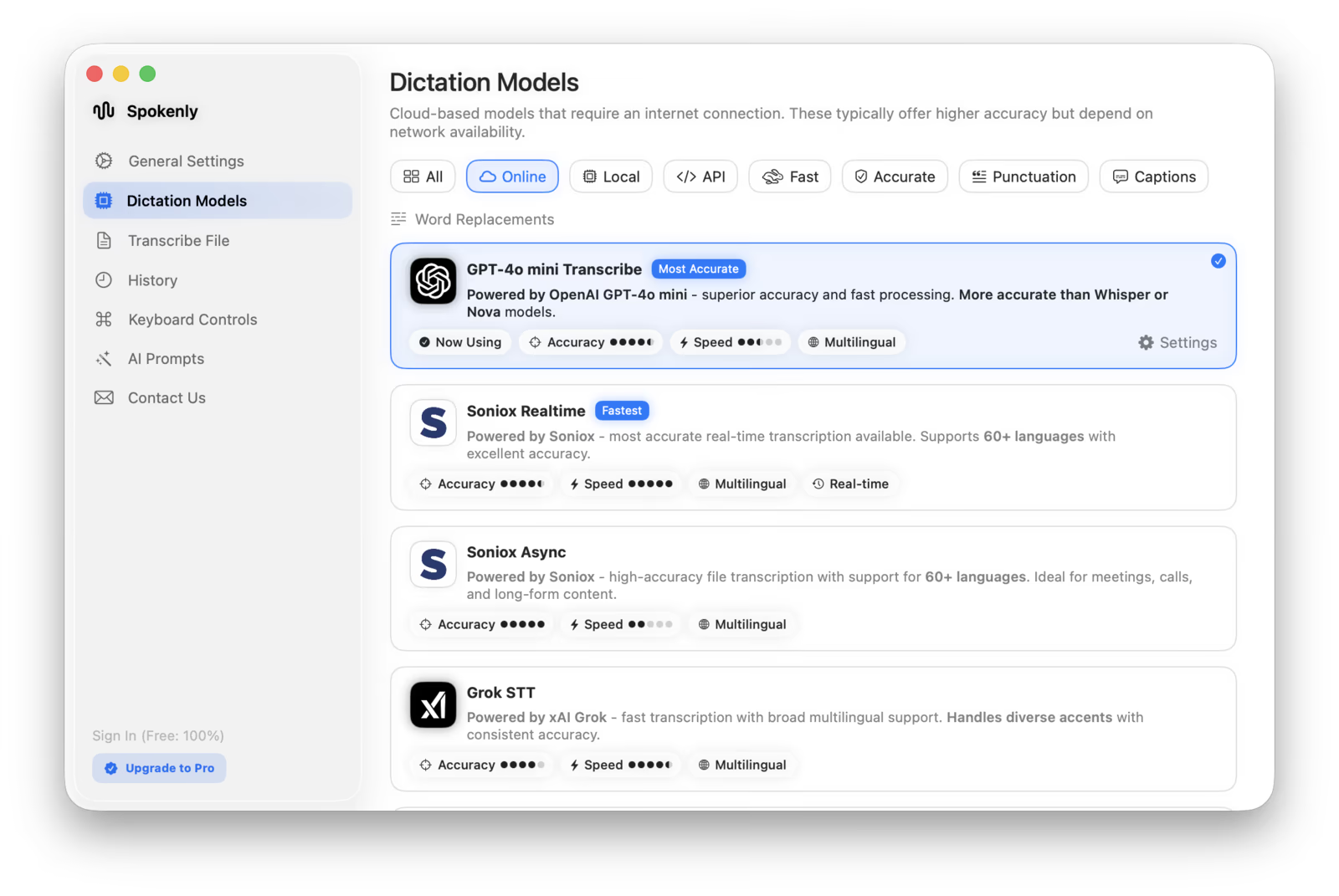
Spokenly is the fastest path to accurate speech-to-text on any Mac. Free with local Parakeet and Whisper, plus BYOK cloud transcription using your own OpenAI, Deepgram, Groq, or Soniox key.
- Cloud models like GPT-4o Transcribe and Deepgram Nova by default for top accuracy on jargon and accents.
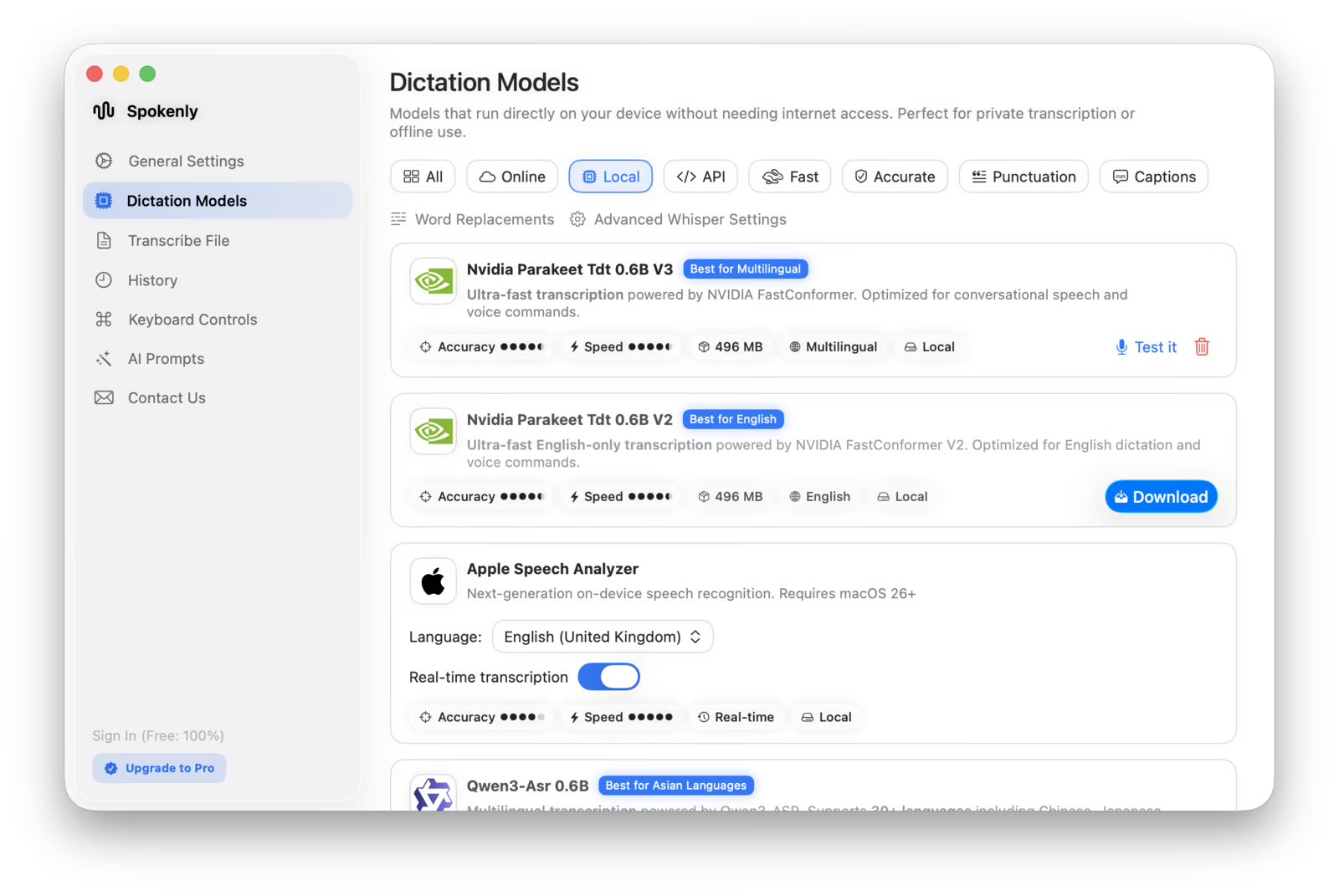
- Optional local Parakeet or Whisper for fully offline mode. Audio never leaves your Mac.
- 100+ languages out of the box, including Indic, Southeast Asian, and African languages Apple does not ship.
- Optimized for Apple Silicon. Parakeet V3 runs locally on the Neural Engine for real-time streaming on M-series Macs.
- Works in any Mac app: Cursor, VS Code, Terminal, Office, Slack, where Apple Dictation can fail.
See Spokenly for Mac for the full feature list.
What Is Speech to Text on Mac
Speech to text on Mac means converting spoken words into typed text. macOS includes three distinct features:
- +Apple Dictation: system-wide voice typing in any text field, free, on-device on Apple Silicon.
- +Voice Memos and Notes transcription: file-based transcription introduced in macOS Sequoia.
- +Voice Control: full hands-free Mac operation, including dictation, under Accessibility.
Third-party apps add what Apple does not: cloud models with higher accuracy, local Whisper or Parakeet for privacy, no time limits, custom vocabulary, multilingual auto-detection, and per-app behavior.
Apple Dictation (Built-in)
Apple Dictation has been part of macOS since 2012. On Apple Silicon Macs (M1 and later) it runs entirely on-device once the language model downloads. macOS Ventura and later add automatic punctuation, and Sonoma improved live preview latency.
Strengths: free, always available, on-device privacy, works in every text field. Weaknesses: ~50 languages only, 60-second silence cutoff, no custom vocabulary, accuracy regressions reported across recent releases, frequent silent failures after macOS updates.
For full enable steps, see how to use dictation on Mac. For shortcut customization, see Mac dictation shortcut.
Voice Memos and Notes Transcription
macOS Sequoia (15.0) added file-based transcription to Voice Memos and Notes. Drag any MP3, M4A, or WAV into a Note and macOS produces a transcript automatically. Voice Memos shows a speech-bubble icon above playback to view the transcript.
Languages are limited (about 10 with English variants, Spanish, Portuguese, Italian, French, German, Japanese, Korean, and Chinese). No speaker diarization, no SRT export, basic accuracy on long files. Useful for short personal recordings; not for podcasts or interviews.
Voice Control (Accessibility)
Voice Control is a full accessibility feature under System Settings, Accessibility. It controls every UI element by voice (open menus, click buttons, scroll, edit text) and includes dictation. No 60-second timeout, no shortcut required to start.
Power users with motor impairments rely on Voice Control as their primary input. Steeper learning curve than dictation alone, but unmatched for hands-free operation.
Third-party Apps Compared
| App | Price | Models | Offline | Languages |
|---|---|---|---|---|
| Spokenly | Free + BYOK | GPT-4o, Deepgram, Soniox, Whisper, Parakeet | Yes | 100+ |
| Apple Dictation | Free | Apple Speech (Sonoma+) | Yes (M1+) | ~50 |
| MacWhisper | Tiered (Free, Pro, Lifetime) | Whisper local only | Yes | 99 |
| SuperWhisper | Free + Pro (annual) | Whisper + GPT cleanup | Yes | 99 |
| Wispr Flow | Free + $12/mo Pro | Cloud only | No | 100+ |
| VoiceInk | Free + paid | Whisper + cloud | Yes | 99 |
| BetterDictation | From $39 lifetime | Whisper + cloud | Yes | 99 |
| Aqua Voice | Free + $8/mo Pro | Cloud only | No | 100+ |
| Dragon for Mac | Discontinued (2018) | n/a | n/a | n/a |
See full breakdown in the 2026 dictation app roundup. Google's new free on-device dictation app for Mac is covered in the Google AI Edge Eloquent review.
Accuracy Benchmarks (WER)
Word Error Rate (WER) measures the percent of words that a model gets wrong. Lower is better. Numbers below come from OpenAI, Deepgram Nova-3 announcement, Soniox 2025 benchmarks, and the Hugging Face Open ASR Leaderboard.
| Model | Clean WER | Real-world WER | Notes |
|---|---|---|---|
| Apple Dictation (Apple Silicon) | ~10% | 15-18% | No official benchmark; community-tested |
| Whisper Large V3 | 2.7% | 8-12% | OpenAI; multilingual |
| Whisper Large V3 Turbo | ~2-3% | 8-12% | Faster, similar accuracy |
| GPT-4o Transcribe | 4.1% | 5-8% | Best on noise and accents |
| Deepgram Nova-3 | 5.3% | 6-9% | Streaming-optimized |
| Soniox | 6.5% | 7-10% | Best for voice agents |
| Parakeet V3 (CoreML) | ~2.5% LibriSpeech | 6-8% | Apple Silicon optimized |
| Human baseline | 2-4% | 2-4% | Reference |
Practical takeaway: Apple Dictation is fine for casual writing but loses ground on technical terms, proper nouns, and accented English. Cloud GPT-4o Transcribe and Deepgram Nova-3 are 2-3x more accurate on real-world audio.
Best Setup by Mac Model
Local model performance depends heavily on the chip and RAM. Use this table to pick the right setup for your machine.
| Chip | Best local model | Latency | Recommendation |
|---|---|---|---|
| Intel Mac | Apple Dictation only | Cloud (1-3s) | Use cloud STT (Spokenly default) |
| M1 (8GB) | Whisper Small or Parakeet V3 | Sub-second | Casual use, Parakeet runs faster |
| M1 / M2 (16GB+) | Whisper Large V3 Turbo | Sub-second | Excellent free-tier setup |
| M3 / M3 Pro | Parakeet V3 (CoreML) | Real-time | Feels instant on dictation |
| M4 / M4 Pro / Max | Parakeet V3 + Whisper Turbo | Real-time | Flagship config, no compromises |
On Intel Macs, skip local models entirely and use cloud GPT-4o Transcribe through Spokenly. The CPU overhead of running Whisper locally on Intel is not worth the latency penalty.
Offline vs Cloud
The trade-off comes down to privacy, latency, and accuracy.
- Local (Whisper, Parakeet, Apple): audio never leaves your Mac. Required for medical, legal, or confidential journalism use cases. Apple Silicon M3+ chips run local Parakeet at sub-100ms latency, fast enough to feel instant.
- Cloud (GPT-4o Transcribe, Deepgram Nova, Soniox): highest accuracy, especially on noisy audio, accents, and technical jargon. Spokenly BYOK lets you use your own API key, keeping costs at provider rates (often a few cents per hour).
Free vs Paid
What each tier actually buys you for Mac speech-to-text in 2026:
- +Apple Dictation (free): baseline, ~50 languages, 60s cutoff, no customization.
- +Spokenly (free with BYOK): 100+ languages, local Whisper and Parakeet, custom vocabulary, no timeout. Cloud usage at your API provider rate.
- ~Subscription apps ($3-15/mo): Wispr Flow, SuperWhisper, Aqua Voice, BetterDictation. Higher polish, but locked into their cloud and pricing.
- -One-time apps (MacWhisper $50): file transcription specialist, no streaming dictation in same app.
Use Cases
Writers and journalists
Dictate 2000-word drafts into Scrivener or Notion without 60s timeouts. Spokenly continuous mode plus AI cleanup, or Apple Silicon Dictation for short bursts.
Developers
Speak prompts into Claude Code, Cursor, Codex. Spokenly with custom dictionary recognizes file paths, function names, and library names. See voice dictation for developers.
Accessibility (RSI / motor)
Type at 125 WPM hands-free vs 40 WPM keyboard. Apple Voice Control plus Dictation, or Spokenly with hold-to-talk hotkey.
Multilingual users
Switch between English, Spanish, Mandarin, Russian in same session. Whisper-based apps with auto-detect, or GPT-4o Transcribe via Spokenly. Apple requires manual language switch.
Meeting and lecture transcription
Record system audio and microphone directly in Spokenly on Mac, then transcribe the saved meeting locally or in the cloud. Existing Zoom recordings can also be imported into Spokenly or MacWhisper.
Medical, legal, journalism
HIPAA and source-confidential audio. Spokenly local-only mode with Whisper or Parakeet keeps audio on-device.
For coding-specific dictation, see voice dictation for developers.
Dragon for Mac Replacement
Nuance discontinued Dragon Professional Individual for Mac in 2018. Many users still searching for it. Here is the closest replacement by use case:
- +General dictation: Spokenly with custom vocabulary and word replacements.
- +Medical: Spokenly local mode with Whisper Large V3, plus a custom medical vocabulary list.
- +Legal: Spokenly with on-device Parakeet for HIPAA-grade privacy.
See Dragon alternative for the full migration guide.
How to Set Up
Apple Dictation
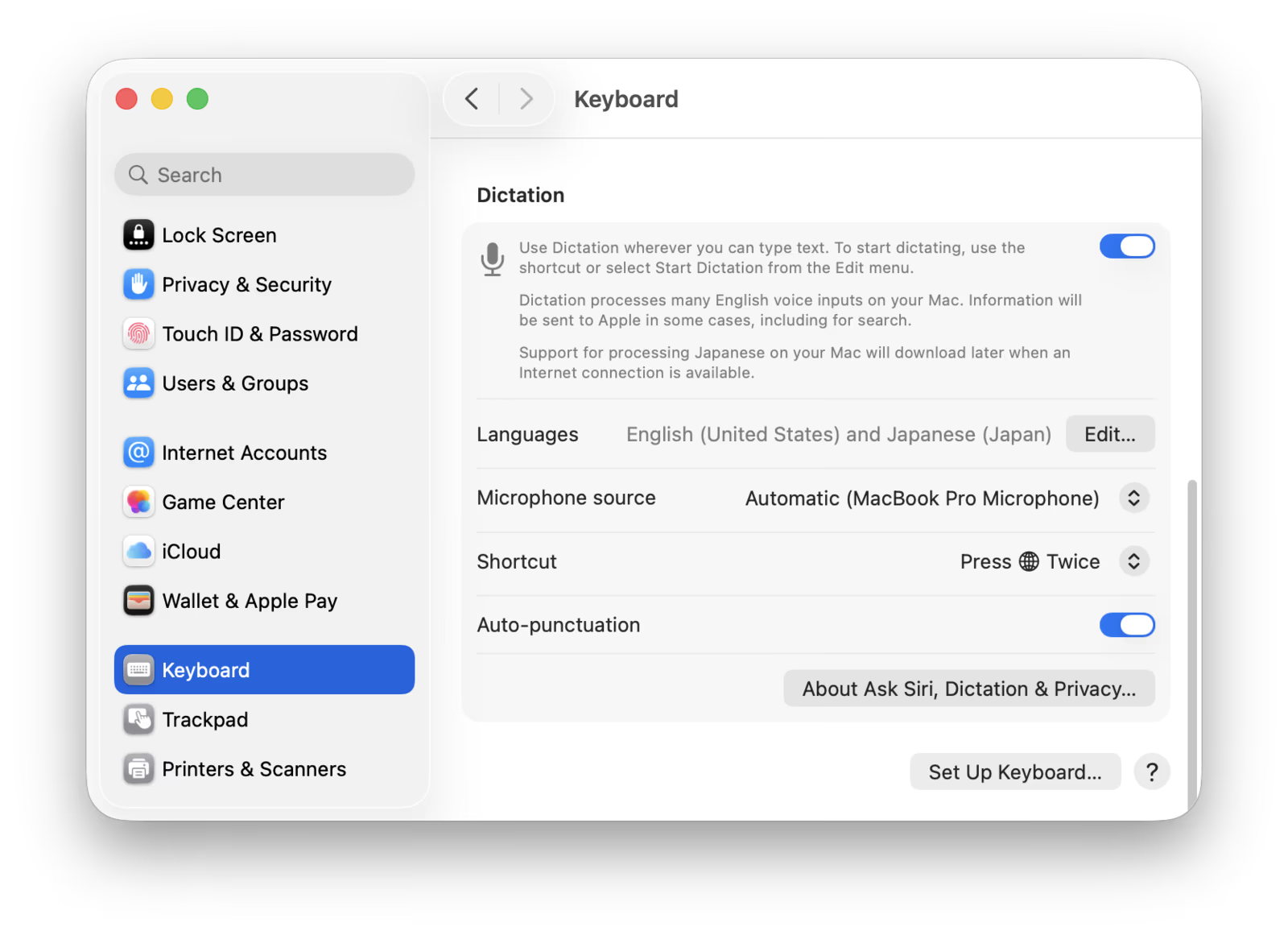
- 1Open System Settings, Keyboard.
- 2Scroll to Dictation, toggle on.
- 3Pick a language and shortcut.
- 4Press the shortcut in any text field, start speaking.
Spokenly
- 1Download Spokenly from spokenly.app or the Mac App Store. Free, no account required.
- 2Pick a model: GPT-4o Transcribe (cloud), Deepgram Nova (cloud), Whisper or Parakeet (local).
- 3Enter your API key for cloud models (BYOK) or skip for local-only.
- 4Configure a hotkey (any key, modifier combo, or push-to-talk).
- 5Press the hotkey in any Mac app, start speaking.
Common Problems
- Dictation not working after macOS update: toggle off and on in Keyboard settings.
- 60-second cutoff: switch to Spokenly with no timeout, or use Voice Control.
- Words appear then disappear: hung corespeechd daemon. See full fix.
- Microphone permission denied for an app: re-grant in Privacy and Security.
- Voice Control conflicts with Dictation: disable Voice Control in Accessibility.
- AirPods produce garbled text: set Microphone to Always Left or Always Right in Bluetooth.
For the complete troubleshooting flow with Terminal commands, see Mac dictation not working.
FAQ
How do I turn on speech to text on Mac?
Open System Settings, click Keyboard in the sidebar, scroll to the Dictation section, and toggle it on. macOS downloads the on-device language model the first time. Press the dictation shortcut (F5 on 2021+ MacBooks, fn fn on older models) in any text field and start speaking.
Is Mac dictation free?
Apple Dictation is free and built into macOS. Spokenly is also free with local Parakeet and Whisper models, plus BYOK cloud transcription using your own OpenAI, Deepgram, or Groq API key for pennies per hour. Apps like Wispr Flow ($15/mo) and Aqua Voice ($10/mo) charge subscriptions.
What is the most accurate speech-to-text app for Mac in 2026?
GPT-4o Transcribe and Deepgram Nova-3 lead in real-world accuracy with 5-9% word error rate, beating Apple Dictation's 15-18% on technical and accented speech. Spokenly defaults to GPT-4o Transcribe for top accuracy. For offline use on Apple Silicon, Parakeet V3 and Whisper Large V3 Turbo come closest to cloud quality.
Does Mac dictation work offline?
Apple Dictation runs fully on-device on Apple Silicon Macs (M1 and later) once the language model finishes downloading. Spokenly defaults to cloud models but ships local Parakeet and Whisper for offline mode. Click any local model in Spokenly settings to switch.
How do I dictate longer than 60 seconds on Mac?
Apple Dictation has a 60-second silence cutoff that cannot be disabled. For continuous dictation, use Spokenly with push-to-hold mode (stays active while key is held) or toggle mode (no timeout). Voice Control (System Settings, Accessibility) also has no silence timeout but is full-device control, not just dictation.
What is the difference between Dictation and Voice Control on Mac?
Dictation converts speech to typed text in any field. Voice Control is a full accessibility tool that controls every UI element by voice (open menus, click buttons, scroll). Voice Control includes dictation but adds device-control commands. They share the same audio pipeline and cannot run simultaneously.
Can I dictate in multiple languages on Mac?
Apple Dictation supports about 50 languages but requires manual language switching mid-session. Modern alternatives like Spokenly auto-detect 100+ languages and handle code-switching mid-sentence using Whisper or GPT-4o Transcribe.
How do I transcribe a voice memo or audio file on Mac?
Drag any MP3, M4A, WAV, MP4, or MOV file into Spokenly and it transcribes locally with Whisper or via cloud models. Apple Notes (macOS Sequoia and later) auto-transcribes dropped audio files. iPhone Voice Memos with iOS 18+ also exposes a transcript view (tap the speech bubble icon).
Which Mac is best for speech to text?
Any Apple Silicon Mac (M1 or later) with 16GB RAM handles local Whisper Large V3 Turbo at near-real-time. M3 and M4 chips with Parakeet V3 produce sub-100ms latency that feels instant. Intel Macs are limited to cloud transcription. See the by-Mac-model table above for chip-specific recommendations.
Is Spokenly really free?
Yes. Spokenly is free forever with local Parakeet and Whisper models. The BYOK feature lets you use your own OpenAI, Deepgram, Groq, or Soniox API key for cloud-quality transcription at provider prices (often a few cents per hour). The optional Pro plan adds advanced features but is not required.
Ready to try Spokenly?
Free to use with local models. No account required.
Download Spokenly