
Use the Dictation Key as Shortcut
Activate Spokenly with the built-in microphone key on your MacBook keyboard.
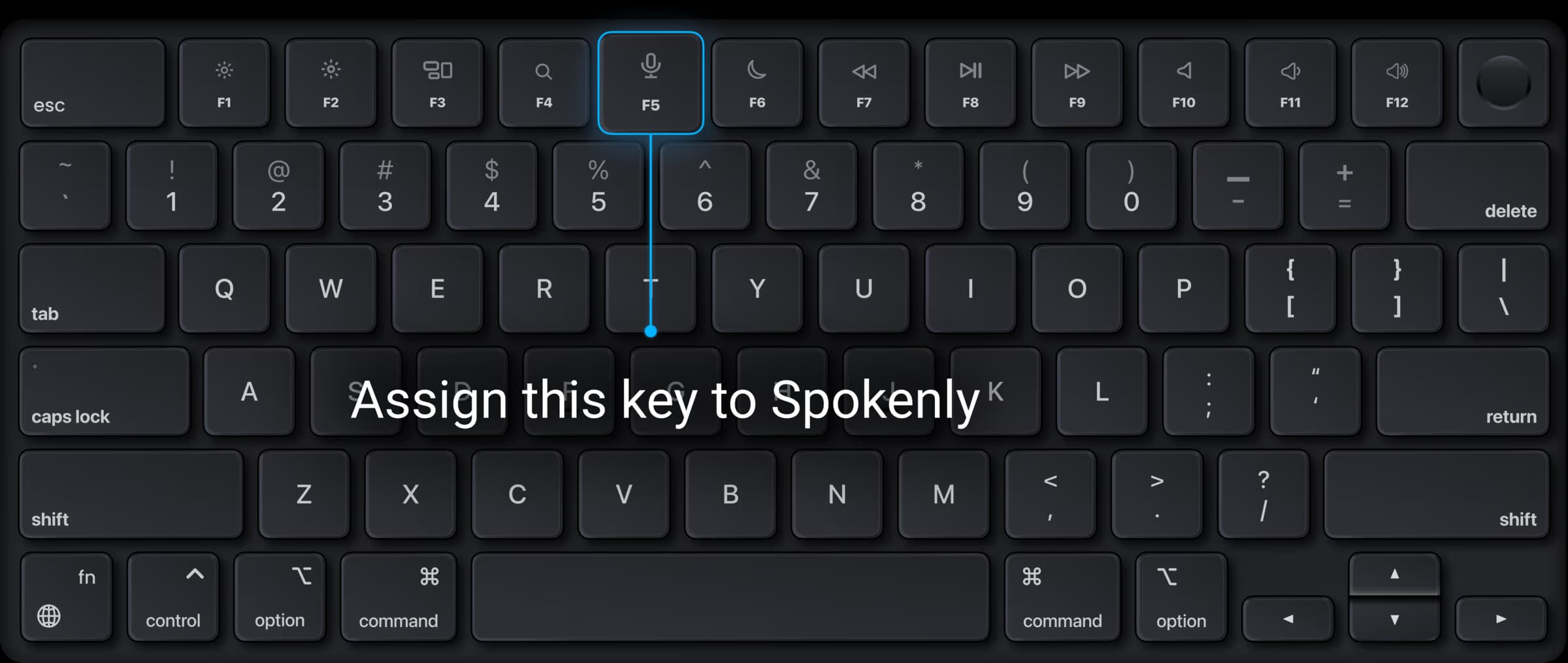
MacBook keyboards have a dedicated dictation key in the function row. You can remap it to activate Spokenly instead of Apple Dictation using hidutil, a built-in macOS utility. No third-party tools required.
Quick Setup
Open Terminal and remap the dictation key to F5:
hidutil property --set '{"UserKeyMapping":[{
  "HIDKeyboardModifierMappingSrc":0xC000000CF,
  "HIDKeyboardModifierMappingDst":0x70000003E
}]}'
In Spokenly, go to Settings > Recording Shortcut and record F5 by pressing the dictation key.
This works immediately, but resets on restart. To make it permanent, use a LaunchAgent.
Persist Across Restarts
A LaunchAgent loads the remap automatically at login.
Create the file ~/Library/LaunchAgents/app.spokenly.KeyRemapping.plist with this content:
<?xml version="1.0" encoding="UTF-8"?>
<!DOCTYPE plist PUBLIC "-//Apple//DTD PLIST 1.0//EN"
  "http://www.apple.com/DTDs/PropertyList-1.0.dtd">
<plist version="1.0">
<dict>
    <key>Label</key>
    <string>app.spokenly.KeyRemapping</string>
    <key>ProgramArguments</key>
    <array>
        <string>/usr/bin/hidutil</string>
        <string>property</string>
        <string>--set</string>
        <string>{"UserKeyMapping":[{
            "HIDKeyboardModifierMappingSrc":0xC000000CF,
            "HIDKeyboardModifierMappingDst":0x70000003E
        }]}</string>
    </array>
    <key>RunAtLoad</key>
    <true/>
</dict>
</plist>
Load it:
launchctl bootstrap gui/$(id -u) \
  ~/Library/LaunchAgents/app.spokenly.KeyRemapping.plist
Undo
Reset the mapping:
hidutil property --set '{
  "UserKeyMapping":[]
}'
If you installed the LaunchAgent, remove it too:
launchctl bootout gui/$(id -u) \
  ~/Library/LaunchAgents/app.spokenly.KeyRemapping.plist
rm ~/Library/LaunchAgents/app.spokenly.KeyRemapping.plist
On some managed (MDM) Macs, hidutil may be restricted by your organization's policies.